
Intrastat is statistical reporting about goods moving between European Union member states. If your company receives goods from another EU country or sends goods to one, it may need to submit a monthly declaration. Odoo can help prepare the report using information recorded in your products, contacts and accounting documents.
This guide explains the reporting obligation and follows a purchase and sale through to an Intrastat report. The walkthrough uses Odoo terminology and the approach documented for Odoo 19; available menus and national exports depend on your edition, modules and fiscal localization.
What Is Intrastat, and Why Is It Needed?
Intrastat collects information about goods traded between EU member states: what moved, where it went, its quantity and its value. Goods generally move within the EU single market without the customs declarations used at its external borders. National authorities still need information about that trade.
The resulting statistics help national authorities and Eurostat analyse trade flows and economic activity. Intrastat is separate from your VAT return and does not replace it. Purchasing a service from another EU country does not, by itself, create an Intrastat goods movement. Source: Eurostat international trade statistics.
| Term | Meaning | Example |
|---|---|---|
| Arrivals | Goods received from another EU country | Germany → Poland |
| Dispatches | Goods sent to another EU country | Poland → France |
Which Companies Must Submit Intrastat?
The obligation can apply to manufacturers, distributors, wholesalers, retailers and ecommerce businesses. It generally concerns VAT-registered businesses moving goods between EU countries when the value of the relevant flow exceeds a national threshold.
Arrivals and dispatches are assessed separately. A company may have to report only arrivals, only dispatches, or both. The relevant figure is the value of the goods flow; total company revenue alone does not determine the obligation.
There is no single EU-wide threshold. Countries set their own thresholds, and some use notification or survey-selection arrangements. Where threshold rules apply, exceeding the applicable threshold in the previous year generally means reporting from January; exceeding it during the current year generally means reporting from the month of exceedance. Check the rules for the country and year concerned. Source: Your Europe reporting requirements.
How Often Must Companies Report?
The standard reporting period is a calendar month. National rules determine the submission deadline, whether a declaration is needed for months without reportable movements, and when the obligation ends. Do not assume the Intrastat deadline or frequency follows your VAT return. Source: Eurostat.
How Does Intrastat Fit into Odoo?
Your employees already record different parts of a transaction in Odoo Purchase, Odoo Inventory, Odoo Sales and Odoo Accounting.
| Document | Purpose |
|---|---|
| Purchase Order | Records the order placed with a supplier |
| Receipt | Records goods received into the warehouse |
| Vendor Bill | Records the supplier’s invoice in accounting |
| Sales Order | Records the customer’s order |
| Delivery Order | Records the warehouse dispatch |
| Customer Invoice | Records the invoice issued to the customer |
A warehouse receipt and a vendor bill describe different parts of a purchase. One records the physical receipt; the other records its financial side. An invoice is also different from a payment.
The standard Odoo Intrastat report uses product, partner and invoice/bill information. Correct warehouse operations alone do not guarantee a complete declaration: accounting records and classifications need to agree with the reportable movements.
A Complete Example: From Purchase to Intrastat Report
Consider a fictional company, Baltic Components, based in Poland. It purchases mounting brackets from Germany and sells some of them to France. Its accountant has already confirmed reporting obligations for both directions.
All goods movements and related invoices fall in the same month. Amounts are in euros, with no returns, discounts or additional charges. The screenshots illustrate the interface; their company names, products and values are separate from this example.
Step 1: Enable Intrastat
Open Accounting → Configuration → Settings, enable Intrastat and save. Choose suitable default transaction codes for invoices and refunds. A Transaction Code describes the nature of an operation, such as an ordinary purchase/sale or a return. Review exceptions individually.
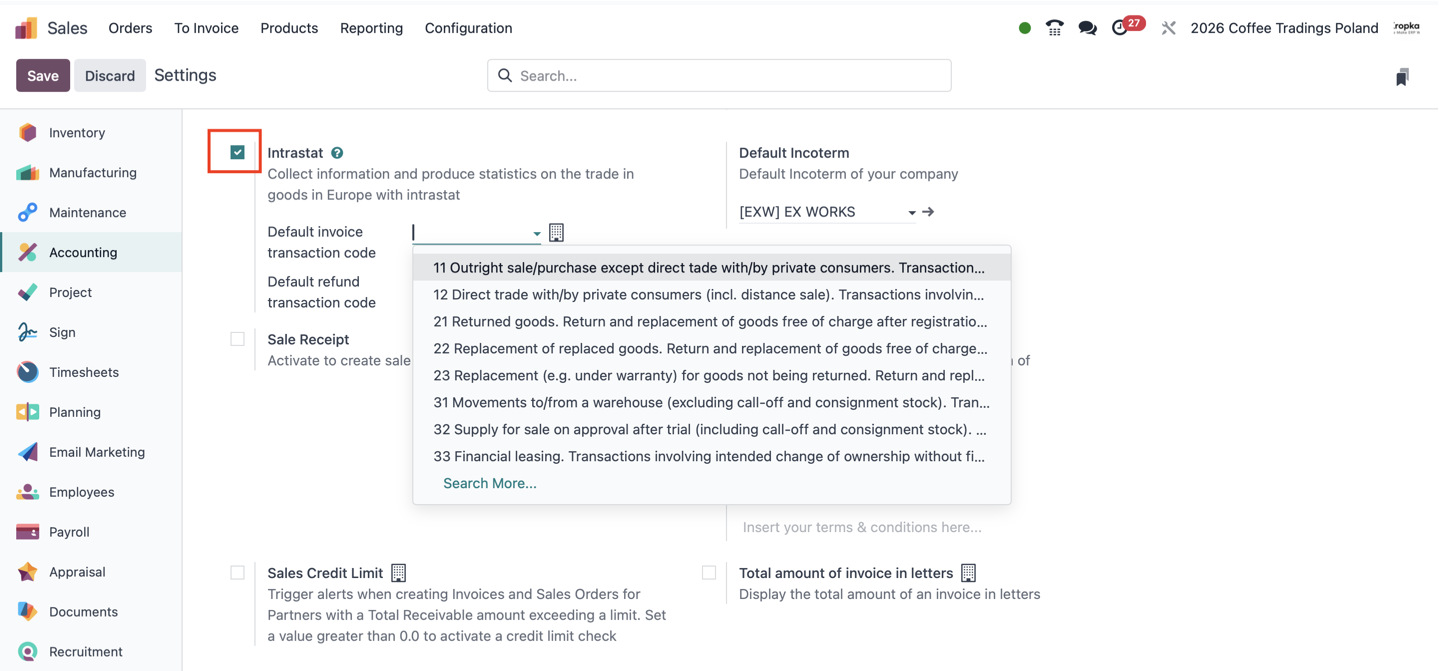
Incoterms describe how certain delivery responsibilities, costs and risks are allocated between seller and buyer. Use the agreed terms; the EXW value shown above is not a recommendation for every shipment.
Step 2: Prepare the Product
Each mounting bracket weighs 2 kg without packaging and originates in Germany. Open the product and check its Intrastat fields in the Accounting tab.
| Term | Meaning |
|---|---|
| Commodity Code | A classification identifying the goods; Intrastat uses eight-digit Combined Nomenclature (CN) codes |
| Country of Origin | The origin established under the applicable origin rules |
| Net Mass | The weight without packaging |
| Supplementary Units | An additional measurement required for certain codes, such as pieces, litres or square metres |
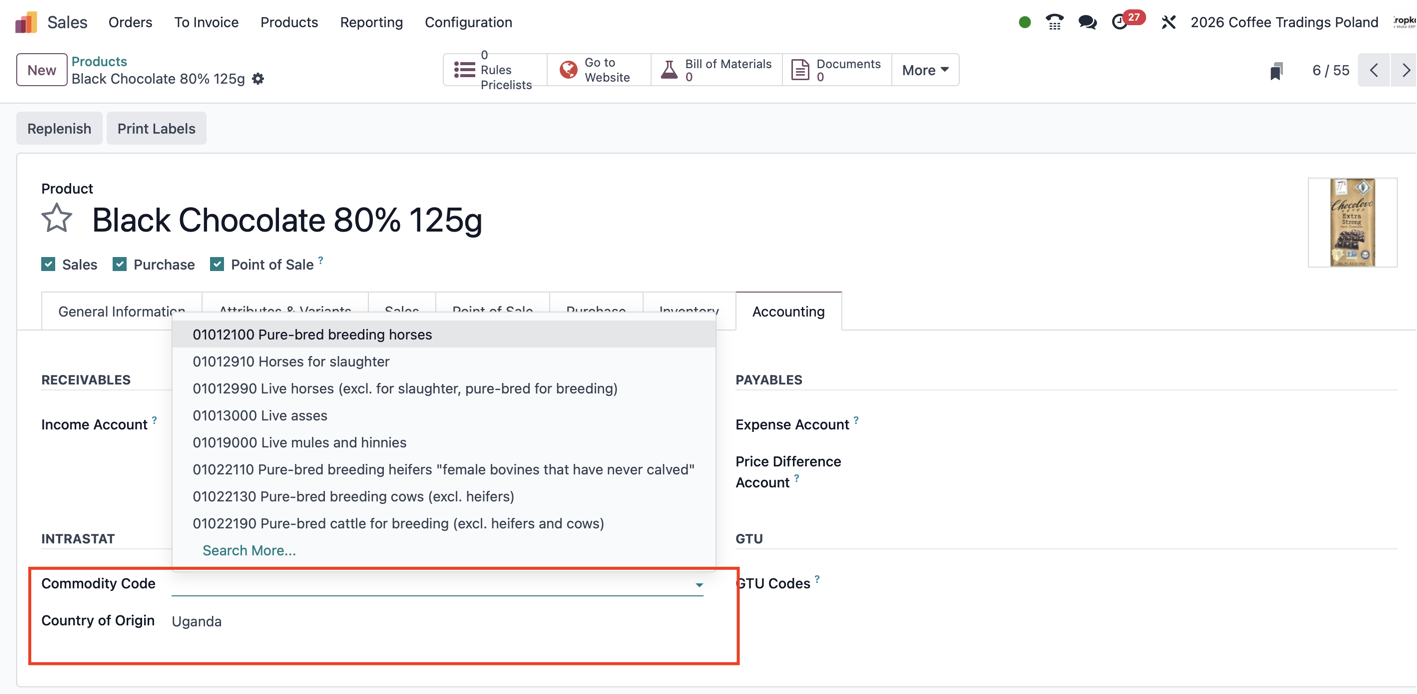
Search for the classification matching the actual goods. The horse and cattle codes visible in the dropdown are unrelated to chocolate or to our brackets. An internal SKU is not a commodity code.
Country of origin and country of dispatch can differ. A German supplier could ship goods manufactured elsewhere. Check the relevant weight and supplementary-unit information as well.
Step 3: Check Supplier and Customer Information
In Odoo, customers and suppliers are contacts, also called partners. Check the German supplier and French customer records, including Country, VAT number and delivery addresses. A VAT number identifies a registration for value-added tax purposes.
Check the goods’ physical route: the customer’s registered address may differ from the delivery location.
Step 4: Purchase 100 Brackets from Germany
Baltic Components buys 100 brackets at €20 each: €2,000 excluding VAT.
- Purchasing confirms a Purchase Order for 100 brackets.
- The warehouse receives the goods and validates the Receipt.
- Accounting checks and posts the Vendor Bill for €2,000.
For the Polish company, this is an arrival: Germany → Poland. The net mass is 100 × 2 kg = 200 kg. Payment to the supplier is a separate event.
Step 5: Sell 40 Brackets to France
The company sells 40 brackets at €35 each: €1,400 excluding VAT.
- Sales confirms a Sales Order for 40 brackets.
- The warehouse validates the Delivery Order.
- Accounting posts the Customer Invoice for €1,400.
This is a dispatch: Poland → France. The net mass is 40 × 2 kg = 80 kg. The other 60 brackets remain in Poland; that balance creates no further cross-border movement.
Step 6: Review the Transaction Details
Check the Transaction Code, Intrastat Country, transport mode where required, Incoterm, quantities and values in the relevant invoices and bills. In our example, both shipments travel by road. Defaults reduce repetitive entry, but returns and replacements need their own classification.
Step 7: Generate the Report
Open Accounting → Reporting → Audit Reports → Intrastat Report and select the company and reporting month. You can also search for the report using Odoo’s command palette.
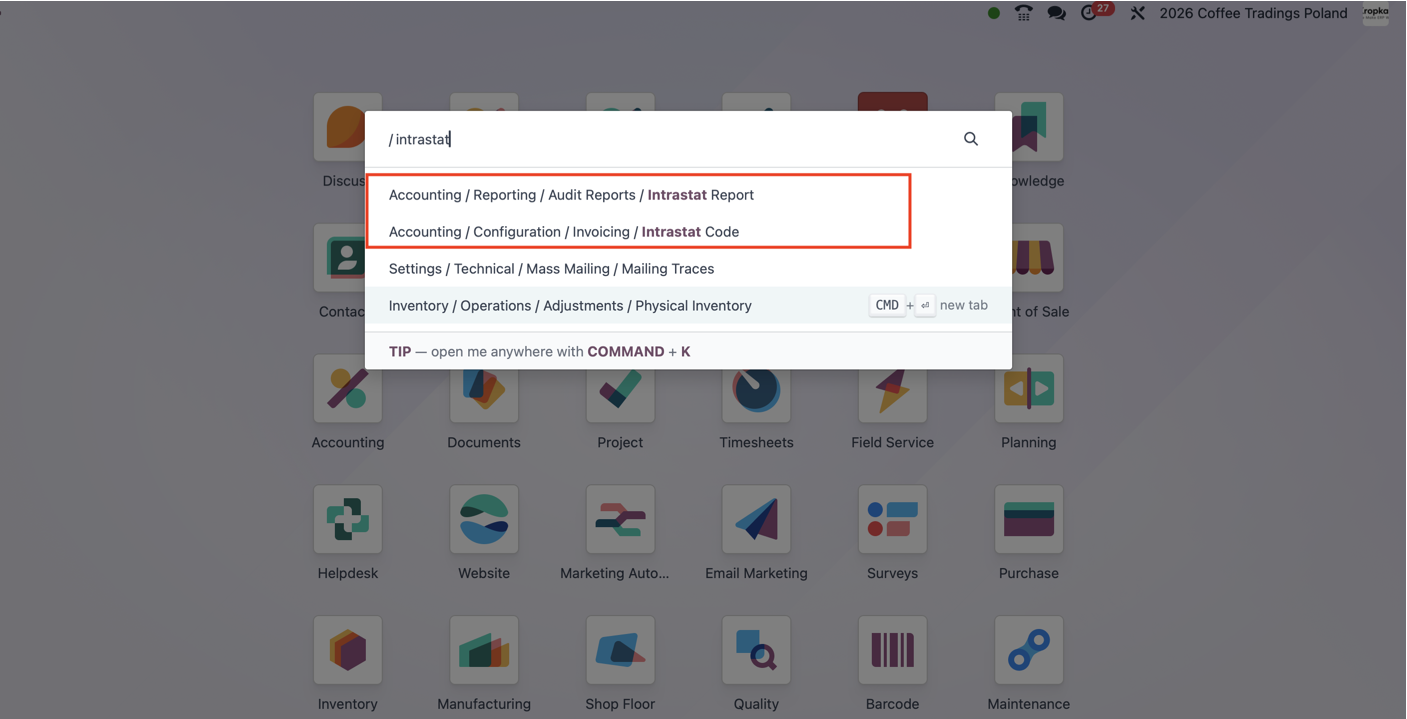
The accountant expects these control totals:
| Flow | Route | Quantity | Net mass | Invoice value, excluding VAT |
|---|---|---|---|---|
| Arrival | Germany → Poland | 100 brackets | 200 kg | €2,000 |
| Dispatch | Poland → France | 40 brackets | 80 kg | €1,400 |
This is a simplified explanation; the declaration contains additional fields. Arrivals and dispatches stay separate. Do not subtract one value from the other and report the difference.
Step 8: Review and Submit
Compare the report with the purchase, sales and warehouse documents. Check completeness, countries, codes, quantities, weights and values. When movements and invoices fall in different months, review the reporting-period treatment under national rules.
Also check whether a statistical value is required. This is determined for statistical reporting and may differ from the invoice value, for example because of transport-cost treatment.
Odoo documents PDF, XLSX and XML exports. Confirm that the installed localization produces the format accepted by your national authority. Generating a report and successfully submitting the declaration are separate steps. Keep the authority’s acceptance confirmation. Source: Odoo 19 Intrastat documentation.
Baltic Components has now created its monthly report showing 100 brackets received from Germany and 40 dispatched to France, ready for review and the applicable national submission process.
Make Intrastat Part of Everyday Data Entry
Reliable reporting begins when employees create products and record transactions. Purchasing maintains supplier information, warehouse staff record movements, sales maintains customer and delivery details, and accounting checks classifications, values and deadlines.
If those records are incomplete, opening the report will not supply the missing facts. Agree who maintains each field before the first reporting deadline.
For the wider financial workflow, explore Odoo Accounting and our guide to cash flow management in Odoo. Cash flow tracks money; Intrastat describes goods flows.
Need help aligning product data, warehouse processes and accounting? Explore Odoo consulting or discuss your reporting workflow with Alexander Koltsov.