
A customer payment increases your bank balance. But does it also increase revenue? Not necessarily. The money might be an advance for work you have not completed, payment of an existing invoice, or proceeds from a loan. Each increases cash, but each has a different effect on the company’s financial position.
The accounting equation explains those differences: Assets = Liabilities + Equity.
In Odoo ERP, a business does not need to reconstruct this equation manually after every transaction. Once accounting is configured, routine documents such as posted customer invoices and vendor bills generate journal entries automatically. Those entries change account balances, which feed financial reports. Odoo Accounting documentation describes the underlying double-entry system.
Your team records business operations; Odoo performs the corresponding accounting calculations according to the configured rules. Understanding the equation helps you interpret the result rather than calculate the entire balance sheet yourself.
This guide follows one company from its opening balance through everyday transactions. The continuous example uses accrual accounting and euros, excluding taxes and foreign exchange to keep the calculations readable. A separate invoice illustration explains tax treatment. Odoo references follow version 19; available features depend on edition, installed applications, localization, and configuration.
1. What the accounting equation means
| Component | Meaning | Examples |
|---|---|---|
| Assets | Resources controlled by the company | Bank funds, receivables, equipment, prepaid expenses |
| Liabilities | Obligations the company must settle | Bank loans, supplier payables, customer advances |
| Equity | Residual interest after liabilities are deducted from assets | Contributed capital, retained earnings, current-period result |
Equity = Assets − Liabilities. A company with €70,000 in assets and €10,000 in liabilities has €60,000 in equity. That does not mean it has €60,000 in its bank account: assets may include equipment, unpaid invoices, or payments for future services.
The Balance Sheet presents the position at a particular date. The Profit and Loss Statement explains revenue and expenses over a period. In Odoo, these are connected views of the accounting records, rather than separate spreadsheets maintained after each invoice.
2. Begin with localization and opening balances
Localization establishes the country-specific foundation
When starting with Odoo Accounting, select and verify the appropriate fiscal localization. Localization packages provide country-specific accounting foundations, including accounts, taxes, and reporting functionality where supported. They may require additional configuration. See Odoo fiscal localizations.
Country-specific codes, tax rules, and reporting formats vary. The underlying double-entry relationship remains Assets = Liabilities + Equity. Opening balances, product accounts, taxes, payment methods, and reporting requirements complete the setup.
Opening balances establish the starting position
For a newly funded company, the first entries may record owners’ contributions. For an existing company moving into Odoo, opening balances represent its position at the migration date. Opening equity is not necessarily initial contributed capital. An established business may have accumulated profits, losses, borrowings, receivables, and payables. Equity can be zero or negative.
| Opening account | Debit | Credit | Classification |
|---|---|---|---|
| Bank | €50,000 | — | Asset |
| Equipment | €20,000 | — | Asset |
| Bank loan | — | €10,000 | Liability |
| Contributed capital | — | €60,000 | Equity |
| Total | €70,000 | €70,000 |
€70,000 assets = €10,000 liabilities + €60,000 equity. We assume no accumulated depreciation or retained earnings at the starting date.
For an existing business, import the relevant opening balances and supporting outstanding customer and supplier items. Their details must agree with ledger totals and must not be counted twice through both document imports and opening entries. See Odoo accounting setup.
3. How Odoo turns a customer invoice into accounting
Consider a completed service invoiced for €1,000 plus an illustrative 20% sales tax. The customer owes €1,200, but revenue is €1,000. The €200 tax is recorded separately. This example is independent of the tax-free continuous example below.
| Account | Debit | Credit | Effect |
|---|---|---|---|
| Accounts receivable | €1,200 | — | Customer debt increases |
| Service revenue | — | €1,000 | Revenue increases |
| Sales tax payable | — | €200 | Tax liability increases |
| Total | €1,200 | €1,200 | Entry balances |
The user does not normally type these accounting lines manually. Posting the invoice generates its entry from configured accounts and taxes. The customer record supplies the receivable account and other defaults. See Odoo customer invoices.
Revenue accounts can come from the product or service, its category, or the sales journal default; invoice lines can override them. Tax treatment follows the configured rules. The illustration assumes invoice-based recognition of ordinary sales tax; other treatments can produce different entries. See Odoo journals.
Foreign-currency invoices
Odoo supports multi-currency invoices, bills, and payments. With currencies and rates configured, users work with the document currency while accounting also records company-currency amounts. Settlement exchange differences can be recorded automatically using configured accounts and journals. See Odoo multi-currency accounting.
Does every action create an entry?
Every posted accounting entry participates in double-entry accounting, but not every business action creates an entry. A quotation proposes a sale; a sales order records a commercial commitment. A draft invoice awaits posting. A commercial document can exist before its amount appears in accounting reports.
4. How debits and credits change balances
| Account type | Usually increases with | Usually decreases with |
|---|---|---|
| Asset | Debit | Credit |
| Liability | Credit | Debit |
| Equity | Credit | Debit |
| Revenue | Credit | Debit |
| Expense | Debit | Credit |
These are normal balance conventions; contra accounts such as accumulated depreciation differ. Every journal entry must have equal debits and credits and can contain two or many lines. The chart of accounts identifies accounts; the general ledger records movements and balances.
Correct classification matters as much as a balanced entry. For routine users, this table explains the result; it does not mean every salesperson must select debits and credits. See Odoo account types.
5. Revenue, customer advances, and cash receipts differ
| Event | Meaning | Typical effect |
|---|---|---|
| Owner contributes money | Owner funds the company | Bank and contributed capital increase |
| Loan received | Company borrows money | Bank and loan liability increase |
| Customer prepays | Performance is still owed | Bank and advance liability increase |
| Earned service invoiced | Payment remains outstanding | Receivable and revenue increase |
| Existing invoice paid | Debt is collected | Bank increases; receivable decreases |
Under accrual accounting, revenue reflects earned consideration under the applicable recognition policy. Receiving money alone does not establish earned revenue. A €6,000 advance for unperformed services increases cash but also represents an obligation.
IFRS 15 describes a contract liability when consideration is paid or due before the relevant transfer of goods or services. Recognition can occur over time or at a point in time depending on the contract and policy. See IFRS 15, paragraph 106 and Revenue Recognition.
Odoo supports percentage and fixed down payment invoices, with configurable accounts. A down payment invoice does not by itself establish the correct recognition treatment. An unearned amount must remain appropriately classified until recognition is justified. Down payments and deferred revenues support configured workflows. Automation applies the rules established during implementation.
6. A continuous example: operations and account balances
All eleven transactions belong to the same company, in sequence. The tables show the economic effect of completed operations. Document workflows and configured adjustments produce corresponding entries; users do not recalculate the whole balance sheet each time.
Transaction 1: Buy equipment for €5,000
| Account | Before | Entry | After |
|---|---|---|---|
| Bank | €50,000 | Credit €5,000 | €45,000 |
| Equipment | €20,000 | Debit €5,000 | €25,000 |
Assuming the purchase qualifies for capitalization, total assets remain €70,000. Cash is exchanged for equipment. Cost is subsequently recognized through depreciation rather than an immediate expense.
Transaction 2: Receive a €10,000 loan
| Account | Before | Entry | After |
|---|---|---|---|
| Bank | €45,000 | Debit €10,000 | €55,000 |
| Bank loan | €10,000 | Credit €10,000 | €20,000 |
Assets and liabilities increase by €10,000. Revenue and equity do not change: €80,000 = €20,000 + €60,000.
Transaction 3: Receive a €6,000 customer advance
| Account | Before | Entry | After |
|---|---|---|---|
| Bank | €55,000 | Debit €6,000 | €61,000 |
| Customer advances | €0 | Credit €6,000 | €6,000 |
The service has not been performed. Assets and liabilities increase; profit is unchanged: €86,000 = €26,000 + €60,000.
Transaction 4: Earn €4,000 of the advance
| Account | Before | Entry | After |
|---|---|---|---|
| Customer advances | €6,000 | Debit €4,000 | €2,000 |
| Service revenue | €0 | Credit €4,000 | €4,000 |
Assume €4,000 now qualifies for recognition. No additional cash is received. The obligation falls and profit rises before related expenses: €86,000 = €22,000 + €64,000. The remaining €2,000 is still unearned.
Transaction 5: Invoice a separate earned service for €3,000
| Account | Before | Entry | After |
|---|---|---|---|
| Accounts receivable | €0 | Debit €3,000 | €3,000 |
| Service revenue | €4,000 | Credit €3,000 | €7,000 |
The service is performed and payment is due later. Receivables increase without cash moving. Posting the configured invoice generates its entry: €89,000 = €22,000 + €67,000.
Transaction 6: Collect the €3,000 receivable
| Account | Before | Entry | After |
|---|---|---|---|
| Bank | €61,000 | Debit €3,000 | €64,000 |
| Accounts receivable | €3,000 | Credit €3,000 | €0 |
One asset replaces another; total assets stay €89,000. Revenue is not recorded again.
Transaction 7: Receive a €1,500 supplier bill
| Account | Before | Entry | After |
|---|---|---|---|
| Service expense | €0 | Debit €1,500 | €1,500 |
| Accounts payable | €0 | Credit €1,500 | €1,500 |
The supplier service is consumed this period, but unpaid. Payables increase and expense reduces equity: €89,000 = €23,500 + €65,500.
Transaction 8: Pay the supplier
| Account | Before | Entry | After |
|---|---|---|---|
| Accounts payable | €1,500 | Debit €1,500 | €0 |
| Bank | €64,000 | Credit €1,500 | €62,500 |
Assets and liabilities decrease. No second expense is created: €87,500 = €22,000 + €65,500.
Transaction 9: Prepay €12,000 for future rent
| Account | Before | Entry | After |
|---|---|---|---|
| Prepaid rent | €0 | Debit €12,000 | €12,000 |
| Bank | €62,500 | Credit €12,000 | €50,500 |
The payment covers twelve future months. A prepayment made is a right to future benefits; an advance received is an obligation. Total assets stay €87,500.
Transaction 10: Recognize one month of rent
| Account | Before | Entry | After |
|---|---|---|---|
| Rent expense | €0 | Debit €1,000 | €1,000 |
| Prepaid rent | €12,000 | Credit €1,000 | €11,000 |
Equal monthly allocation gives €12,000 ÷ 12 = €1,000. Assets and equity decrease without another payment.
Transaction 11: Recognize €500 of depreciation
| Account | Before | Entry | After |
|---|---|---|---|
| Depreciation expense | €0 | Debit €500 | €500 |
| Accumulated depreciation | €0 | Credit €500 | €500 |
Gross equipment cost remains €25,000; carrying value becomes €24,500. Depreciation reduces profit and net assets without a current cash payment.
7. How the company balance changes
| Stage | Assets | Liabilities | Equity | Explanation |
|---|---|---|---|---|
| Opening | €70,000 | €10,000 | €60,000 | Starting position |
| Buy equipment | €70,000 | €10,000 | €60,000 | Exchange assets |
| Receive loan | €80,000 | €20,000 | €60,000 | Increase assets and debt |
| Receive advance | €86,000 | €26,000 | €60,000 | Increase cash and obligation |
| Earn advance | €86,000 | €22,000 | €64,000 | Release liability; earn revenue |
| Invoice service | €89,000 | €22,000 | €67,000 | Increase receivable and revenue |
| Collect invoice | €89,000 | €22,000 | €67,000 | Replace receivable with cash |
| Supplier expense | €89,000 | €23,500 | €65,500 | Increase payable; reduce profit |
| Pay supplier | €87,500 | €22,000 | €65,500 | Reduce cash and payable |
| Prepay rent | €87,500 | €22,000 | €65,500 | Exchange assets |
| Monthly rent | €86,500 | €22,000 | €64,500 | Consume prepayment |
| Depreciation | €86,000 | €22,000 | €64,000 | Reduce carrying value and profit |
Equity includes the current-period result. Every row satisfies Assets = Liabilities + Equity. Some operations change the composition of assets; others change profit without changing cash.
8. How Odoo builds the Balance Sheet
An account balance is the accumulated position of an individual account. The company Balance Sheet groups relevant balances into assets, liabilities, and equity, including the financial result. The chain is business document → posted journal entry → account movements → balances → financial report.
For an asset account with a debit opening balance: closing balance = opening balance + debits − credits.
| Bank movement | Amount |
|---|---|
| Opening | €50,000 |
| Equipment | −€5,000 |
| Loan | +€10,000 |
| Customer advance | +€6,000 |
| Receivable collection | +€3,000 |
| Supplier payment | −€1,500 |
| Rent prepayment | −€12,000 |
| Closing | €50,500 |
Open Accounting → Reporting → Balance Sheet, then select the company, date, and relevant options. Revenue and expenses contribute to Profit and Loss, and the result contributes to equity; not every account appears as an individual Balance Sheet row. See Odoo reporting.
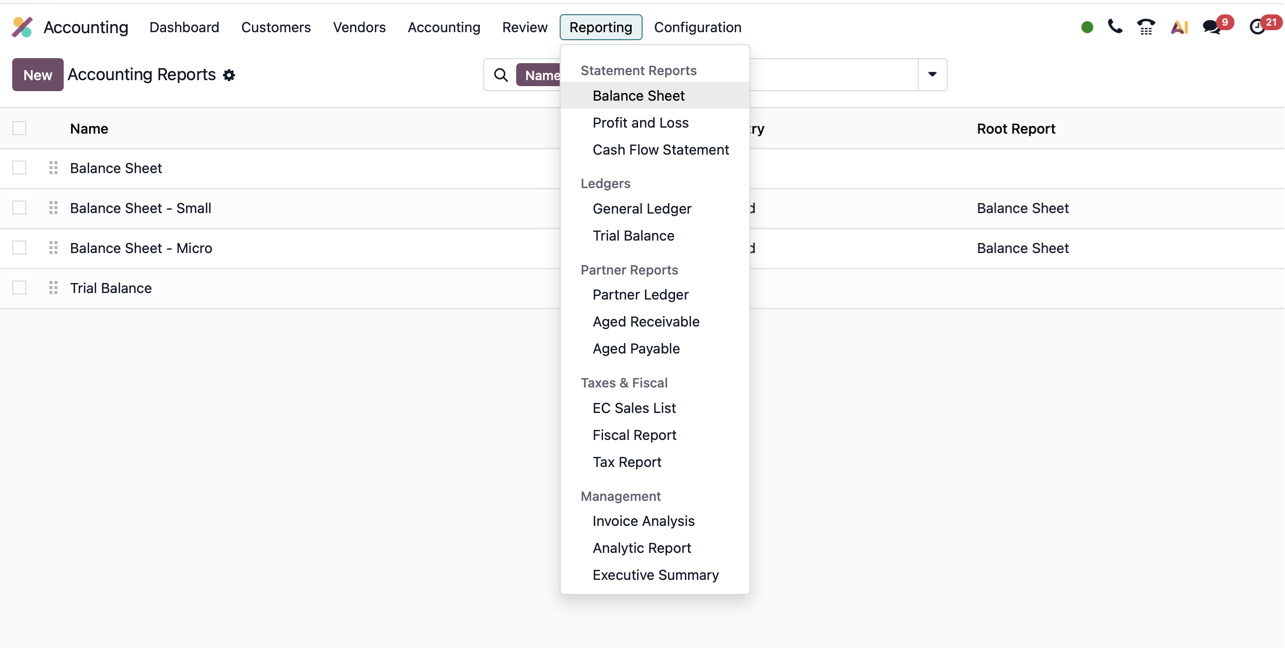
The example shows completed bank movements. Odoo payment workflows may use outstanding receipts or payments accounts before bank reconciliation clears the intermediate position. Some Odoo 19 configurations do not create an entry when payment is merely registered. See Odoo payments. Complete the workflow and review exceptions rather than manually reconstructing the balance sheet.
9. Read closing balance and profit together
| Closing balance-sheet item | Amount |
|---|---|
| Bank | €50,500 |
| Equipment, gross | €25,000 |
| Accumulated depreciation | −€500 |
| Prepaid rent | €11,000 |
| Receivables | €0 |
| Total assets | €86,000 |
| Bank loan | €20,000 |
| Customer advances | €2,000 |
| Payables | €0 |
| Total liabilities | €22,000 |
| Contributed capital | €60,000 |
| Current-period profit | €4,000 |
| Total equity | €64,000 |
| Profit and loss item | Amount |
|---|---|
| Revenue from advance | €4,000 |
| Separate service revenue | €3,000 |
| Total revenue | €7,000 |
| Supplier expense | −€1,500 |
| Rent expense | −€1,000 |
| Depreciation | −€500 |
| Profit | €4,000 |
Profit is €4,000, but bank funds increased only €500. Loans, advances, purchases, prepayments, and non-cash costs explain the difference. The Cash Flow Statement helps interpret cash movements. Odoo presents connected views from accounting records so management can focus on meaning and decisions.
A separate Balance Sheet from the ERPixel demo
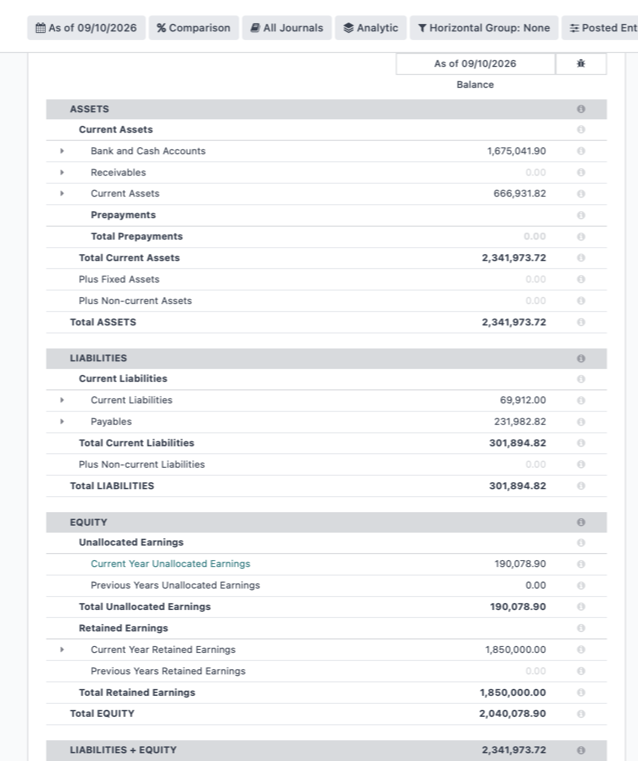
The screenshot below uses an independent demo dataset, not the €86,000 worked example. Its figures are left unchanged. They reconcile: €2,341,973.72 assets = €301,894.82 liabilities + €2,040,078.90 equity. The report illustrates the screen and grouping, rather than the transactions described above.
10. Different Balance Sheet formats from the same records
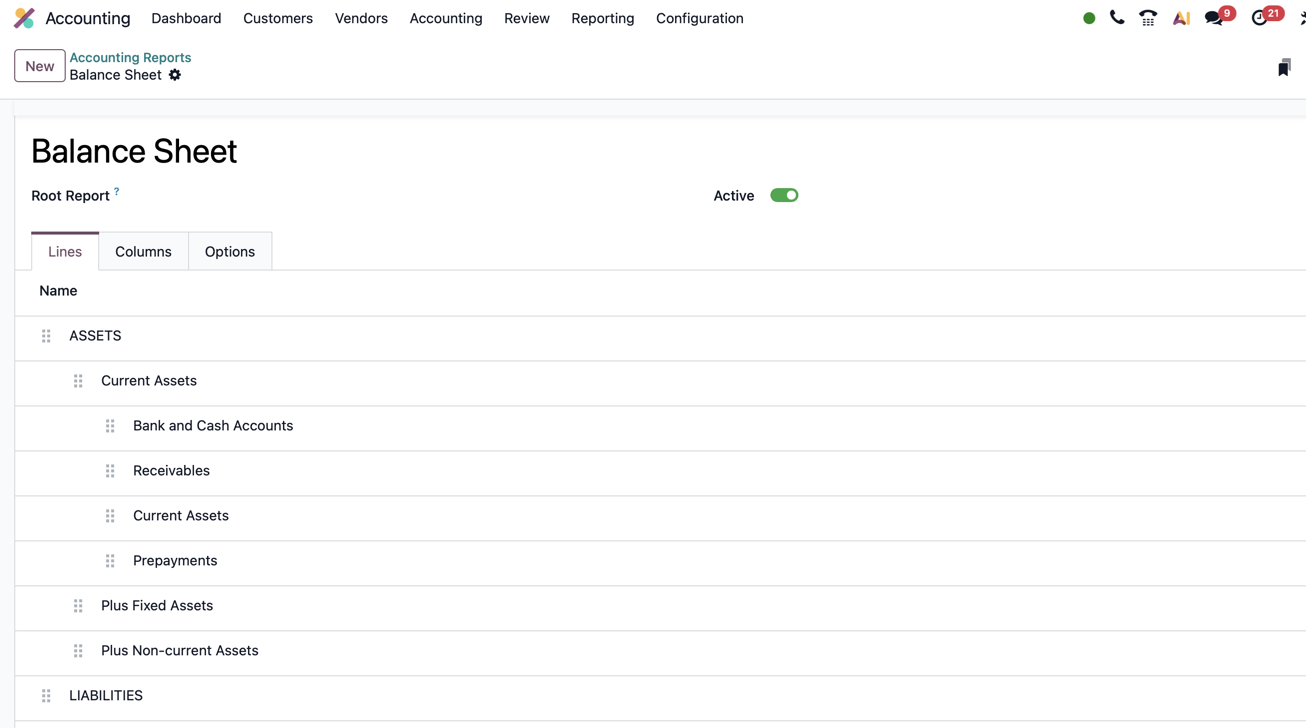
Management, investors, and fiscal authorities may need different detail. Odoo’s reporting framework supports specific groupings and layouts based on the same records. See custom reports.
| View | Purpose | Presentation |
|---|---|---|
| Simplified management | Quick overview | Broad asset, liability, and equity categories |
| Detailed management | Show internal financial relationships | Separate external and intragroup balances |
| Investor | Agreed IFRS-oriented reporting | Defined classifications and supporting schedules |
| Statutory | Applicable local requirements | Country-specific structures and classifications |
| Receivables category | Illustrative amount |
|---|---|
| External customers | €75,000 |
| Intragroup | €25,000 |
| Total | €100,000 |
This independent illustration reclassifies one €100,000 total without changing transactions. Reliable separation requires dedicated accounts or suitable criteria for intercompany transactions. Group consolidation can also require eliminations beyond regrouping one company’s report.
ERPixel experience with IFRS and statutory reporting
At ERPixel, we have implemented this reporting automation repeatedly: helping clients prepare IFRS-based reporting for investors while maintaining reporting suitable for fiscal authorities. The work aligns account mappings, report structures, and required adjustments so outputs remain traceable to source data.
Changing a layout alone does not create IFRS compliance. Differences in recognition or measurement require appropriate adjustments. Once implemented, routine reporting runs from configured rules instead of being rebuilt monthly.
11. Automation needs correct rules and complete operations
| Mistake | Still balances? | Consequence |
|---|---|---|
| Unearned advance recorded as revenue | Yes | Understated liabilities; overstated profit |
| Collection recorded as revenue again | Yes | Duplicate revenue; receivable may remain |
| Eligible equipment incorrectly expensed | Yes | Understated assets and period profit |
| Transaction omitted | Yes | Incomplete records |
| Entry duplicated | Yes | Duplicated effect |
| Wrong date | Yes | Wrong reporting period |
Finance establishes localization, opening balances, mappings, taxes, recognition policies, and reports. Users process documents through agreed workflows. Odoo automates calculations and routine postings; the team reviews unusual transactions and exceptions.
12. What business users need to understand
You do not need to calculate the entire company balance after each operation. Understand whether money is earned revenue or an advance, whether a payment settles an existing invoice, whether a purchase is an expense or asset, whether the document is posted, and whether reconciliation is complete. Correct setup lets these decisions feed Odoo’s workflows and reports.
Explore the ERPixel Odoo demo
Open demo.erpixel.com and use the following public demo credentials:
| Field | Demo value |
|---|---|
| Login | demo@erpixel.com |
| Password | demo@erpixel.com |
Explore Accounting → Reporting → Balance Sheet and compare it with Profit and Loss and ledger views. The demo uses its own data; balances may change and will not match this article’s worked example.
Related guides: Odoo journals and journal entries and accounts payable in Odoo. Explore Odoo Accounting for the application’s wider scope.