
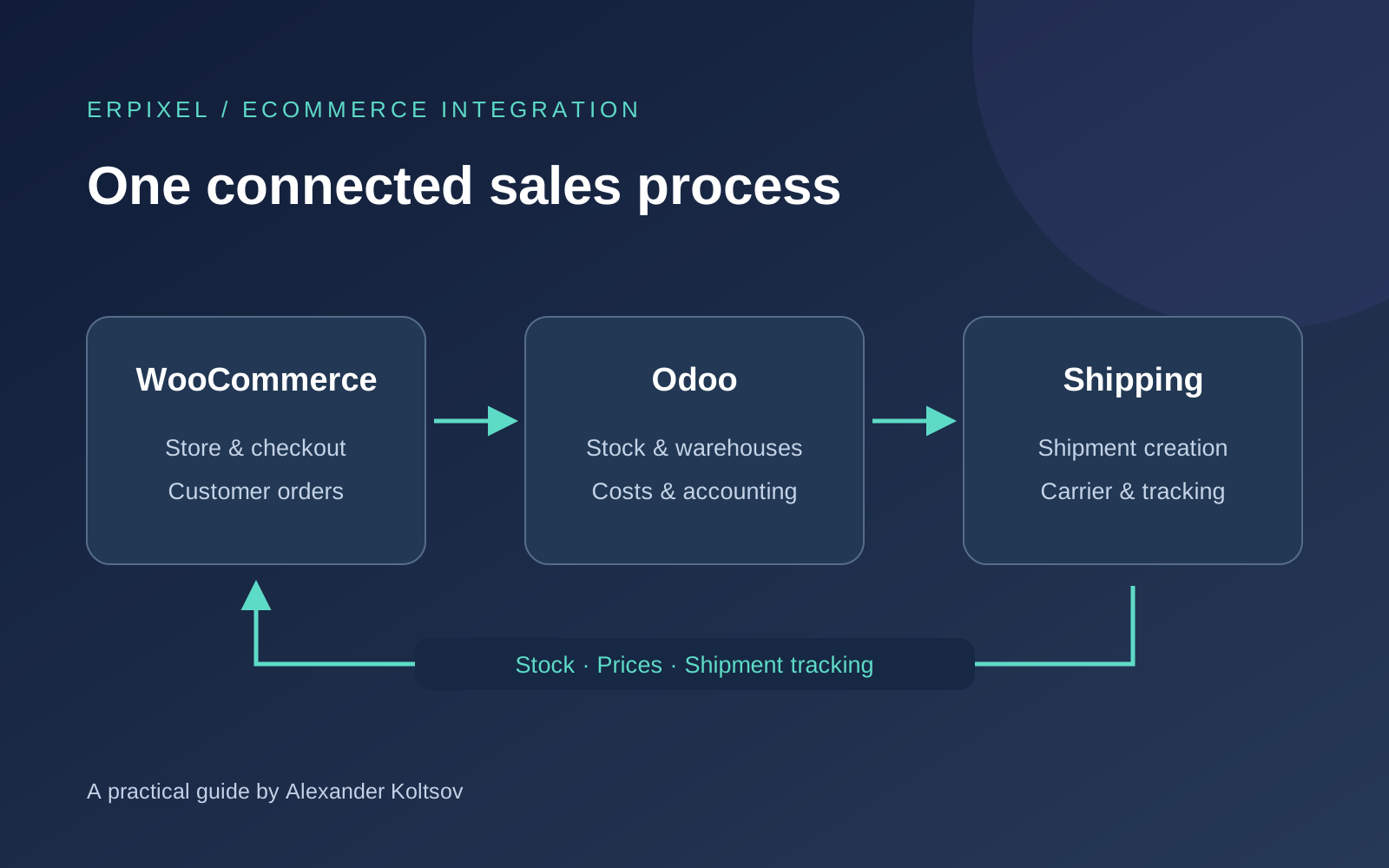
Connecting WooCommerce to Odoo is a familiar, well-established integration project. You do not usually need to develop the connection from scratch. A suitable connector can cover the standard exchange, while the implementation work makes it follow the way your business sells and delivers products.
The division of responsibilities is straightforward: WordPress and WooCommerce run your online store, while Odoo manages products, stock, warehouses, costs and financial records. A shipping integration connects that process to the company delivering the parcel.
In my experience, this is a practical way to automate an online business without replacing the storefront your customers already use.
What Does an Odoo WooCommerce Connector Cost?
The connector itself can be a relatively small purchase.
For a concrete example, when checked on 27 October 2026, VentorTech listed its WooCommerce Connector PRO at €499 as a one-time purchase. It also offered a separate €499-per-year subscription. Compare the support, maintenance and upgrade terms before choosing between them; the same headline price does not mean the same commercial arrangement. See the vendor’s one-time purchase and subscription listings.
That is the connector price, rather than a quotation for the complete implementation.
Your project budget should also account for:
- Your Odoo edition, hosting and subscription requirements.
- Connecting the systems and configuring the exchange.
- Matching existing products and other records.
- Setting up the order-processing workflow.
- Connecting the delivery service.
- Any changes required for a specific business process.
My starting point is to check how much a standard connector already covers. For a conventional store, there is often no reason to commission custom integration software before examining the available solutions.
However, choosing the connector also means checking your Odoo environment. For example, VentorTech lists support for Odoo.sh and on-premise deployments and explicitly excludes Odoo Online. Make this check before purchasing a module. If you are still choosing your setup, our guide to Odoo editions, hosting and implementation costs provides the broader context.
Start with Stock Availability
When business owners think about integration, they often begin with importing orders. That matters, but I would put stock availability at the centre of the discussion.
Your store needs to know what it can sell. If Odoo holds your inventory records, the availability shown in WooCommerce should follow the agreed stock information from Odoo.
This becomes particularly useful when the same products are sold through several channels. The website should not be maintained as a separate stock ledger that someone must repeatedly reconcile by hand.
Before configuring the exchange, we agree what quantity the store should receive. Physical stock, reserved stock and the quantity available for new sales answer different questions. The correct choice depends on your fulfilment process.
Our practical guide to Odoo Inventory explains the wider warehouse and stock-management context.
Decide Where Products and Prices Are Managed
A connector also needs to link the records that make an order understandable in both systems.
Depending on your store and the selected connector, this can include products, variants, attributes and their values, categories, customers, languages, countries, taxes and delivery methods.
The important implementation question is: which system owns each piece of information?
Prices, for example, may be managed in WooCommerce or in Odoo. Both arrangements can be considered, but the direction of exchange must be clear. Two systems independently changing the same price create an avoidable conflict.
My practical recommendation is to use Odoo as the master system for product data, prices and availability where that fits the business.
You maintain the operational information in one place and send the relevant data to your store. Starting this way can resolve many questions about matching records and deciding which version of the data should take precedence.
Existing stores need particular care during the initial matching. We should establish which WooCommerce product corresponds to which Odoo product before enabling routine synchronisation.
Agree When an Order Should Enter Odoo
Installing a connector does not decide your sales process for you.
Consider a simple example: an online bookshop where customers pay during checkout. You may want a successfully paid WooCommerce order to become the starting point for fulfilment in Odoo.
Now consider payment on delivery. Waiting for an online payment would prevent the order from moving forward. In that process, a confirmed but unpaid order needs to reach Odoo so the warehouse can prepare it.
Both are ordinary business scenarios. They require different rules.
Before launch, we agree:
- Which WooCommerce status triggers the order import.
- What should happen to the order after it enters Odoo.
- How the payment method affects processing.
- Which changes should be sent back to the store.
The connector creates the Odoo sales order that an employee would otherwise enter manually. From that point, the configured Odoo workflow handles the next steps.
The WooCommerce sales channel can also help determine how an order is processed, including the relevant warehouse or fulfilment route. Our article on Odoo inventory routes and rules explains that part of the process in more detail.
Include Shipping in the Same Conversation
An Odoo–WooCommerce connection is often only one part of the automation project.
A business normally needs to receive an order, prepare the goods and deliver them. That means we should discuss the shipping integration at the same time.
A typical process looks like this:
- The customer places an order in WooCommerce.
- The order enters Odoo under the agreed status rules.
- Odoo determines the warehouse and fulfilment process.
- The shipping integration creates the shipment with the relevant carrier.
- Shipment references and tracking information return to Odoo.
- Odoo passes the relevant information back to WooCommerce.
- The customer receives the appropriate notification through the configured store workflow.
WooCommerce–Odoo Data Flows at a Glance
This table summarises the Odoo-as-master setup described here. Import statuses and synchronisation timing are agreed during configuration; they are not identical for every connector or store.
| Data | From | To | Trigger |
|---|---|---|---|
| Products, variants and categories | Odoo | WooCommerce | Initial catalogue sync; later changes under the configured sync rules. |
| Stock availability | Odoo | WooCommerce | Stock changes, sent according to the agreed sync timing and quantity rules. |
| Prices | Odoo | WooCommerce | A price update in Odoo, under the configured sync rules. |
| Order, customer and delivery details | WooCommerce | Odoo | The order reaches the agreed import status: paid, or confirmed for payment on delivery. |
| Shipment request | Odoo | Carrier, such as InPost | The order reaches the agreed shipment-creation step, with the warehouse and delivery service determined. |
| Shipment reference and tracking | Carrier | Odoo | The carrier makes the shipment reference and tracking information available. |
| Tracking and shipment status | Odoo | WooCommerce | Tracking becomes available or a shipment event is received, under the agreed status mapping. |
Creating a shipment reference and physically handing a parcel to the carrier are separate events. The status sent to the customer should reflect what has actually happened.
Delivery prices also need clear treatment. The amount charged to the customer at checkout and the amount charged by the carrier are different figures. They should remain distinguishable in the business records.
Our Experience: WooCommerce, Odoo and InPost in Poland
For one of our Polish clients, we connected the WooCommerce store to Odoo and configured the process around InPost delivery.
Product information, categories, prices and stock availability were sent from Odoo to the website. WooCommerce remained the storefront where customers selected products and placed orders.
When an order reached Odoo, it entered the fulfilment process. The InPost integration created the shipment, and the relevant shipment and tracking information was returned through Odoo to WooCommerce. The customer could then receive delivery information through the store’s notification process.
This is the kind of connected workflow I want business owners to consider from the beginning:
WooCommerce sells → Odoo records and processes the order → InPost delivers → shipment information returns to the store.
The sale also feeds the accounting process. The business needs to know what was sold and what amounts it expects to receive from payment providers.
However, importing a paid order and reconciling a payment provider’s settlement are separate tasks. Fees, payouts and bank reconciliation belong to the financial workflow and should be scoped explicitly when required.
Can You Connect Several WooCommerce Stores?
Yes, multi-store setups are possible, provided the selected connector and its licence support them. For example, VentorTech states that its connector can connect multiple WooCommerce stores to one Odoo instance, with separate store settings and synchronisation rules. See its multi-store information.
From the business side, the questions remain practical:
Which products belong in each store? Do the stores use different prices or languages? Do they sell from the same stock? Should their orders follow different fulfilment rules?
The same broader architecture can include other sales channels, such as Amazon, Shopify or a B2B portal. Each connection needs its own scope, but Odoo can provide the shared operational foundation.
Our global ecommerce implementation story describes a more extensive environment involving multiple companies and fulfilment partners.
What We Check Before Launch
I prefer to agree a short set of real business scenarios and follow them through the complete process.
We check whether the correct product and price appear in the store, whether availability updates as intended, and whether an order reaches Odoo with the right customer, items, delivery method and payment information.
Then we follow the order through warehouse processing and shipping, checking what returns to WooCommerce and what the customer sees.
Where applicable, the checks also include payment on delivery, cancellations, refunds and failed exchanges. An unsuccessful synchronisation needs a clear way to be identified and resolved.
These checks turn a working connection into a usable business process.
How to Start with ERPixel
If you already run a WooCommerce store, you can begin with a straightforward description of how you work today:
Where are products and prices maintained? Where is stock recorded? Which payment methods do you accept? Who ships the orders? Which steps do employees still perform manually?
We use that information to select the connector, agree the exchange rules and identify any additional work.
ERPixel provides Odoo integration services as part of the wider Odoo implementation process. We connect the systems around the way your business needs to operate, including inventory, fulfilment and financial processes.
My advice is to establish that structure early. When Odoo manages the operational data and WooCommerce uses it consistently, adding more orders—or another sales channel—becomes easier to organise.
We would be glad to become your Odoo implementation partner. Book a conversation with ERPixel and tell us how your store works today.