
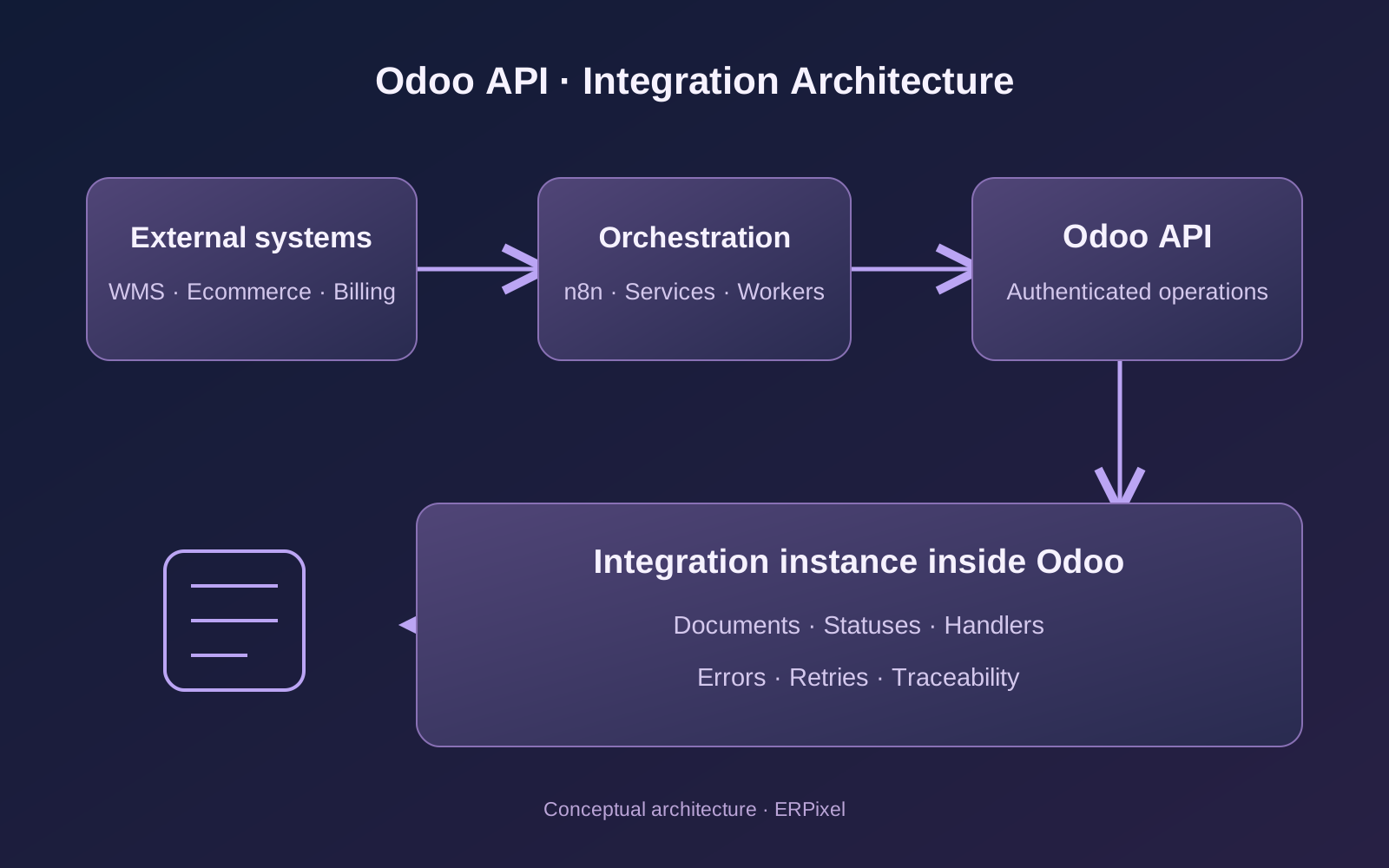
An Odoo integration needs to do more than exchange data. It must explain what happened to each document, identify incomplete operations and recover without creating duplicate orders, deliveries or accounting entries.
The Odoo API provides access to business data and operations. The integration architecture determines whether that access becomes a reliable business process.
At ERPixel, an official Odoo Partner, we develop integration solutions ourselves. For ongoing operational exchanges, our approach includes an integration instance inside Odoo: a control point for documents, processing statuses, handlers, errors and retries.
This article explains how API access, protocol selection, n8n workflows and that internal control layer work together. Technical examples use Odoo 18/19 as their reference versions; compatibility must be checked against the actual deployment.
Start with the business operation and its data ownership
Before choosing an endpoint, define what the integration must accomplish.
For example, “connect the warehouse” may mean several different processes:
- Send an approved delivery order from Odoo to a fulfillment provider.
- Receive the provider’s external order identifier.
- Retrieve processing and shipment statuses.
- Register tracking information.
- Apply confirmed warehouse results to the corresponding Odoo document.
- Reconcile documents that remain incomplete.
Each direction needs an agreed source of truth. A warehouse may own physical shipment confirmation, while Odoo owns the commercial order and its accounting consequences.
The same applies to ecommerce and billing. A storefront can own checkout, while Odoo manages fulfillment. An external billing platform can calculate a charge, while Odoo records its financial consequences.
API connectivity should follow those responsibilities. Otherwise, two systems can keep overwriting each other with technically valid but operationally conflicting data.
XML-RPC, JSON-RPC or JSON-2: which Odoo API should you use?
XML-RPC and JSON-RPC are protocols, rather than Odoo editions. Both expose remote method calls; changing the message format does not change the underlying business operation.
| Interface | Endpoint pattern | Selection guidance |
|---|---|---|
| XML-RPC | /xmlrpc/2/common, /xmlrpc/2/object | Maintain compatible clients on deployments supporting these services. |
| JSON-RPC | /jsonrpc | Useful for compatible existing clients using JSON RPC envelopes. |
| JSON-2 | /json/2/<model>/<method> | Introduced in Odoo 19; assess it for new integrations on supported deployments. |
Odoo’s official documentation marks the legacy external XML-RPC and JSON-RPC services as deprecated from version 19. It currently schedules removal for Odoo 22 and Odoo Online 21.1. This notice does not cover every custom JSON-RPC controller. See Odoo’s External RPC API documentation.
For an existing integration, inspect the client library, endpoints and supported operations before planning migration. For a new project, include future protocol support in the architecture decision.
JSON-2 uses bearer authentication and named JSON arguments. It does not use the legacy execute_kw envelope. See the official JSON-2 API documentation.
Check hosting and customization separately
Version, edition, commercial plan and hosting are separate checks.
Odoo’s external API documentation specifies Custom-plan availability and excludes One App Free and Standard. This commercial restriction should not be presented as a blanket statement that Community installations cannot expose APIs. Assess the actual deployment and its terms.
There is another important boundary: Odoo Online does not support custom modules. An integration instance implemented through our own Python modules therefore requires hosting that permits those modules. See Odoo’s official hosting documentation.
API access alone does not establish that the hosting platform supports the complete proposed architecture.
How to generate an Odoo API key and control its access
Create a dedicated integration user and assign its required permissions.
In Odoo 19, open Preferences → Account Security → New API Key. Give the key a clear description, choose its duration and store the generated value securely; it is displayed once. Follow the official API-key instructions.
Our recommended separation is:
| Connection | Intended access |
|---|---|
| Reporting workflow | Read approved operational data |
| Lead-processing workflow | Read relevant CRM records and create permitted activities |
| Warehouse connector | Access its warehouse documents and integration records |
| Billing connector | Submit agreed financial inputs through controlled processing |
Separate users where permission boundaries differ. Separate keys also make revocation and service ownership easier to manage.
A key is a credential, not a replacement for the permission model. Odoo uses model access rights, record rules and field restrictions. A custom public method must also validate its inputs and authorization; exposing a method does not automatically make its implementation safe. These mechanisms are described in Security in Odoo.
For multi-company exchanges, explicitly validate the destination company, warehouse and related records. An external company code must resolve through an approved mapping.
Store secrets in the automation platform’s credential store or an appropriate secrets manager. Keep them out of workflow payloads, document chatter and diagnostic exports.
Make the first request, then define the write operation
Here is an illustrative Odoo 19 JSON-2 request. Supply the environment variables securely and run it against a test database.
curl --fail-with-body \
  "${ODOO_URL}/json/2/res.partner/search_read" \
  -H "Authorization: bearer ${ODOO_API_KEY}" \
  -H "X-Odoo-Database: ${ODOO_DATABASE}" \
  -H "Content-Type: application/json" \
  --data '{
    "domain": [["is_company", "=", true]],
    "fields": ["name", "email"],
    "limit": 10
  }'
The endpoint format and request headers follow the official JSON-2 request specification.
For a legacy XML-RPC client, authentication returns a user ID. Calls through execute_kw then include the database, user ID and credential; an API key replaces the password argument. See Odoo’s RPC authentication documentation.
Reading records is only the first step. For writes, define the intended outcome:
| Requirement | Processing design |
|---|---|
| Read selected contacts | Query approved fields with filters and pagination |
| Create a draft document | Validate mappings and required values before creation |
| Update an imported document | Resolve its existing external-to-Odoo identity |
| Confirm a business operation | Invoke the appropriate business method |
| Process a compound event | Use a controlled handler with defined transaction boundaries |
Odoo’s model and field concepts are documented in the ORM reference.
For example, “mark this order as confirmed” should describe a business action with its prerequisites. Treating it as an arbitrary status-field update makes the integration dependent on implementation details and risks skipping necessary processing.
The examples here illustrate request design; they have not been executed against a customer database.
How we use n8n around Odoo
ERPixel uses n8n to orchestrate processes that read Odoo data, interact with other services and write results back.
One documented example is an AI-assisted review of CRM opportunities. The process can select relevant crm.lead records, inspect available conversation and call information, determine a next action and create an Odoo activity or update agreed CRM fields.
The engineering questions are concrete:
- Which records qualify for analysis?
- Which fields and conversation data may leave Odoo?
- What output is accepted?
- Which changes require human review?
- How is a repeated run prevented from creating duplicate activities?
- When should the opportunity be reviewed again?
n8n coordinates these steps. Odoo remains responsible for the permitted business records and operations.
Built-in Odoo node or HTTP Request?
The n8n Odoo node supports operations on contacts, opportunities, notes and custom resources. Its credential documentation explains connection settings.
Check the installed node’s protocol compatibility. A node named “Odoo” does not establish support for every API generation or business operation.
For endpoints requiring explicit HTTP configuration, n8n’s HTTP Request node supports headers, JSON bodies, pagination and batching.
A proposed operational flow could be:
Receive event
    → validate source and payload
    → identify integration instance
    → register document/event in Odoo
    → run or schedule its handler
    → record business result
    → notify the responsible person if intervention is needed
This is a reference design, rather than a claim that every ERPixel workflow uses identical steps.
Why we build an integration instance inside Odoo
For recurring business-critical integrations, we consider an integration instance the correct default architecture, regardless of the connected platform.
Here, instance means a custom integration configuration and operational control record inside Odoo. It does not mean a separate Odoo server or database.
The instance identifies the connection and provides access to its processing history. Individual documents or events retain their own lifecycle.
Our approach allows the team to track:
- Documents received or prepared for transmission.
- Their processing status.
- The handler responsible for each operation.
- Links between external identifiers and Odoo records.
- Error reasons and processing attempts.
- Retry actions and the supporting service information.
These are ERPixel integration capabilities and design choices, rather than a universal standard Odoo screen.
The practical benefit is visibility at the business-document level. A support specialist should be able to open an affected order and understand why it has not reached the warehouse.
Connection configuration and document processing have different responsibilities
A useful implementation separates three concerns:
| Concern | Responsibility |
|---|---|
| Integration instance | Connection identity, configuration, company and warehouse mappings |
| Integration document/event | External reference, payload reference, status and processing history |
| Handler | Validation, transformation and execution of the business operation |
Exact models and fields depend on the connector.
For a small one-time export, this machinery may be unnecessary. For continuous order, warehouse or billing exchanges, it becomes the foundation for support and recovery.
The underlying principle should remain consistent even if hosting constraints require some of the control layer to live outside Odoo.
Document status must describe what actually happened
An API response and a business result are different milestones.
Consider an illustrative lifecycle:
Received → Validated → Ready → Processing → Completed
                ↓                    ↓
        Business exception     Retry scheduled
“Received” means the integration has durably accepted responsibility. “Completed” should mean the agreed business outcome has been achieved.
A warehouse accepting an order does not mean it has shipped. An invoice draft existing in Odoo does not mean it has been posted or paid.
For outbound delivery integration, track those milestones separately:
- Odoo document selected and validated.
- Transmission attempted.
- External system accepted or rejected the request.
- External processing status received.
- Final business result applied to Odoo.
This prevents a successful HTTP request from hiding an unfinished operational process.
Retries require idempotency and reconciliation
Suppose a billing platform sends an event. Odoo processes it, but the response is lost. The sender retries.
Without a stable event identity, the second request can create a second financial document.
We recommend defining an identity such as:
integration instance + external event ID + operationA handler should recognize an already processed event and return its existing outcome. Enforce uniqueness and concurrency control at the persistence layer; a separate “search, then create” sequence can race.
Also distinguish duplicate delivery from a legitimate later revision of the same business document. A document ID alone may be insufficient for multiple events.
Errors need different treatment:
| Situation | Appropriate response |
|---|---|
| Invalid or revoked credential | Repair credentials before resuming |
| Missing product or company mapping | Correct configuration, then reprocess |
| Invalid business data | Request correction or operator review |
| Temporary service failure | Use bounded retries with backoff |
| Timeout after submission | Establish whether the operation succeeded before resending |
| Permanently unprocessable event | Isolate it with an actionable error |
A timeout is an unknown outcome, rather than proof that nothing happened.
Reconciliation closes the remaining gaps: compare eligible documents and external results, find missing or stuck operations and route discrepancies for recovery.
Keep transaction boundaries explicit
JSON-2 executes each call in its own transaction. Related operations requiring atomicity should be combined into one server-side method. See Odoo’s transaction guidance.
External side effects need additional design. An Odoo rollback cannot undo an order already accepted by a warehouse.
For outbound exchanges, we recommend an outbox pattern where appropriate: commit the business change and a pending integration event together, then transmit it through a worker. For inbound processing, persist event identity and the local business result together wherever the operation permits.
These are architectural recommendations; their implementation must match the connector.
What our WMS, ecommerce and billing experience shows
ERPixel’s integration work includes warehouse and fulfillment platforms such as Mintsoft, CIRRO, AMZPrep, Japan Logistics Hub and InfoPlus.
Across this project family, the recurring challenges include warehouse mapping, product identity, order routing, stock exchange, fulfillment statuses and shipment tracking. Capabilities differ by provider and connector.
Our CIRRO work, for example, includes scheduled synchronization and delivery-level diagnostics. Scheduled polling should be described accurately; it should not be presented as universal real-time event delivery.
In ecommerce projects, Odoo can act as the operational ERP while Shopify, WooCommerce or Amazon remains a sales channel.
One global implementation involved five legal entities, up to 12 warehouses, Amazon and Shopify, external fulfillment operations and accounting in Xero. We implemented and configured third-party connectors where appropriate, including VentorTech for Shopify. Our custom integration development capability does not mean every connector in every project was written by ERPixel.
For billing, our experience includes transferring revenue transactions from an external platform into a multi-company Odoo financial environment, with hundreds of billing events per day.
That experience reinforces the same requirements: explicit ownership, correct company mapping, document traceability and controlled recovery.
When we recommend RabbitMQ
For more complex integrations with substantial operation volumes, we recommend evaluating RabbitMQ to buffer work and separate producers from processing workers.
External system → intake service → RabbitMQ → worker → Odoo API
                                                         ↓
                                              integration records
RabbitMQ is especially useful when traffic arrives in bursts, several consumers process different operations or a temporary downstream outage must not stop event intake.
The decision should follow peak arrival rates, processing time, acceptable backlog age and recovery requirements. Daily volume alone is insufficient.
Reliable delivery requires application design as well as broker configuration. RabbitMQ documents publisher confirms, consumer acknowledgements, durable storage considerations and possible redelivery. Consumers must tolerate duplicates. See the RabbitMQ Reliability Guide.
A consumer should acknowledge a message after the agreed durable processing boundary. If Odoo commits successfully and the acknowledgement is lost, redelivery must resolve to the existing result.
RabbitMQ does not remove the need for the integration instance. The broker tracks message delivery; the Odoo control layer explains the business document’s processing outcome.
Define acceptance around recovery as well as connectivity
Before release, demonstrate more than a successful sample request.
Send the same event twice. Interrupt a response after processing. Submit a missing product mapping. Revoke a test credential. Process concurrent events for the same document. Confirm that a support user can identify the problem and recover without duplicating the business operation.
The acceptance question is practical:
Can the team explain and recover every document that the integration has accepted responsibility for?
That is the standard we recommend for operational Odoo integrations. Protocol selection establishes the connection. Controlled processing, visible document state and reliable recovery make it maintainable.
For implementation, explore ERPixel’s Odoo Integration services, Odoo Development and n8n Development services.