
When someone asks me which ERP system is best for manufacturing, I want to start with the production process. What do you make? Which components do you keep in stock? Do you manufacture everything yourself, buy subassemblies, or send work to a subcontractor? And what happens after a customer places an order?
A useful comparison should follow that order through the business. Can sales see what is available? Can production identify missing materials? Can purchasing replenish them in time? Can operators record the work, and can management compare the actual cost with the original plan?
In this guide, I will compare the main ERP options and then walk through the process in Odoo, using a manufacturer of tables as our example. This is the kind of connected workflow I want a manufacturing ERP demonstration to explain.
What Does an ERP System Do for a Manufacturer?
An ERP system connects sales, purchasing, inventory, manufacturing, finance, and related business processes. Instead of maintaining a separate version of an order in each department, teams work with linked records: the sale creates demand, stock movements show availability, manufacturing records consumption and output, and financial records capture the associated transactions.
For a manufacturer, the practical value is being able to follow those connections. If a component is late, you need to know which production orders and customer shipments it affects. If a batch takes longer than planned, you need to see where the extra time went and what it means for cost.
The workflow I discuss here concerns companies that consume physical raw materials and components, may manufacture intermediate products, and produce finished goods for sale. A service business has different requirements. Even among manufacturers, a furniture workshop, a food processor, and an engineer-to-order equipment supplier should not use an identical selection checklist.
ERP, MRP, MPS, and Shop Floor: Different Parts of the Process
Material Requirements Planning (MRP) answers a specific question: which materials are needed, in what quantities, and by when? It uses production demand, the bill of materials, available stock, and expected receipts. MRP II, or Manufacturing Resource Planning, extends the scope to broader production resources. SAP explains the distinction between MRP and MRP II.
A Master Production Schedule (MPS) organizes intended production and replenishment across periods. Work-center scheduling organizes the operations needed to carry it out. Shop-floor execution records what actually happens. ERP connects these activities with the rest of the company.
That distinction matters when comparing software. A material calculation can be correct while the assembly station is overloaded. Having every component available does not mean you have enough time or people to ship the order.
In-House Manufacturing, Subcontracting, or Both?
In-house manufacturing means using your own facilities, equipment, and workforce. You control how the work is performed, but you also need to plan capacity, maintain equipment, train operators, and manage quality.
Subcontracting means having a supplier perform some or all of the production. You might send components to a specialist for coating, have a partner assemble a product, or buy a finished item made to your specification. This can provide access to equipment or expertise you do not maintain internally.
Many companies combine these models. A clothing brand may keep design and selected production in-house while outsourcing other operations. An electronics manufacturer may purchase assemblies from a specialist and perform final assembly and testing itself. These are illustrative situations, rather than ERPixel project claims.
For subcontracting, ask who owns the materials, where the stock is recorded, how components reach the supplier, how unused material and scrap are handled, and how the subcontractor's service enters the finished product cost. A purchase order alone does not explain the entire manufacturing flow.
Which Manufacturing ERP Systems Should You Compare?
The following is a shortlist for evaluation, rather than a universal ranking. Choose a specific product and deployment scope before comparing functionality or subscriptions. A brand name such as “Dynamics 365” or “Oracle” covers more than one application.
| ERP option | Scope to investigate | What I would ask to see |
|---|---|---|
| SAP S/4HANA / SAP Cloud ERP | Production within a wider enterprise ERP program. | One product across plants: materials, capacity, execution, and financial reporting. Identify additional planning or execution products in the proposal. |
| Oracle Fusion Cloud Manufacturing | Manufacturing within Oracle's supply-chain application scope. | Discrete or process production, outsourced operations, inventory, and costing, with the required applications itemized. |
| Microsoft Dynamics 365 | Compare Business Central Premium and Supply Chain Management as distinct options. | Your BOM, routing, replenishment, and production reporting in the proposed product and license. Avoid a generic Dynamics feature checklist. |
| Infor CloudSuite | The specific manufacturing suite appropriate to your industry and operating model. | Your production method, multi-site requirements, scheduling constraints, and the proposed industry configuration. |
| Odoo | A connected flow across Sales, Inventory, Purchase, Manufacturing, and related applications. | One customer order through shortages, production, operator reporting, and shipment; confirm the edition and applications used. |
I would not use an old starting-price column to make this decision. Ask for a current proposal covering licenses, configuration, data migration, training, integrations, hosting where applicable, and ongoing support. Then compare the same process and user scope across the proposals.
Additional Options When Subcontracting Is Important
NetSuite, Acumatica, Plex, SYSPRO, and DELMIAWorks are additional options to investigate. Subcontracting should be evaluated as a workflow, alongside any in-house production:
- NetSuite Outsourced Manufacturing documents the connection between procurement and production transactions. Ask to see the material and purchasing records for your subcontracting scenario.
- Acumatica Manufacturing Edition documents outside processing, including materials and subcontractor services. Test an outsourced operation within a production order.
- Plex presents ERP, MES, and supply-chain planning products. Determine which parts of that scope you need and how outside processing fits the proposed setup.
- For SYSPRO, request a demonstration of your subcontracting requirements rather than assuming that general supplier management covers component ownership, external stock, and production cost.
- DELMIAWorks, formerly IQMS, belongs in the manufacturing ERP evaluation. Use the current product name and check the proposed production and execution scope.
These systems are alternatives to investigate. The practical walkthrough below focuses on Odoo because that is the implementation experience I am explaining.
A Customer Orders 100 Tables: How the Odoo Process Works
Let us imagine that we manufacture tables. A customer orders 100 through the website, by phone, or through a salesperson. Whichever channel they use, we need a sales order for 100 finished tables. We do not ship a collection of tabletops and legs.
If all 100 tables are available, the warehouse can fulfill the order from stock. If only 50 are available, we need another 50. If 50 tables are physically present but already reserved for someone else, those units cannot cover this new order.
This is the first useful conversation between sales and the warehouse: on-hand inventory is not the same as available inventory. We must also consider planned receipts and outgoing movements. The Inventory application supplies this context.
For the rest of our example, assume that 50 finished tables are available for this customer and another 50 must be manufactured. Each table requires one tabletop and four legs. The new production therefore needs 50 tabletops and 200 legs.
Odoo can support this flow with configured manufacturing routes and replenishment rules. The replenishment method matters: standard Make to Order procurement should not be described as automatically using existing stock and manufacturing only the shortage. We choose the stock-based or order-linked approach to match how the company operates. See Odoo's replenishment documentation.
The Manufacturing Order Records Consumption and Output
A Manufacturing Order (MO) specifies what we will make and in what quantity. In our case, the order is for 50 tables. It brings together the components needed and the production work associated with that output.
Once production is completed, we record the actual components consumed and the finished goods produced. The warehouse does not have to wait for someone to subtract legs in one spreadsheet and add tables in another. The consumption and output belong to the manufacturing process.
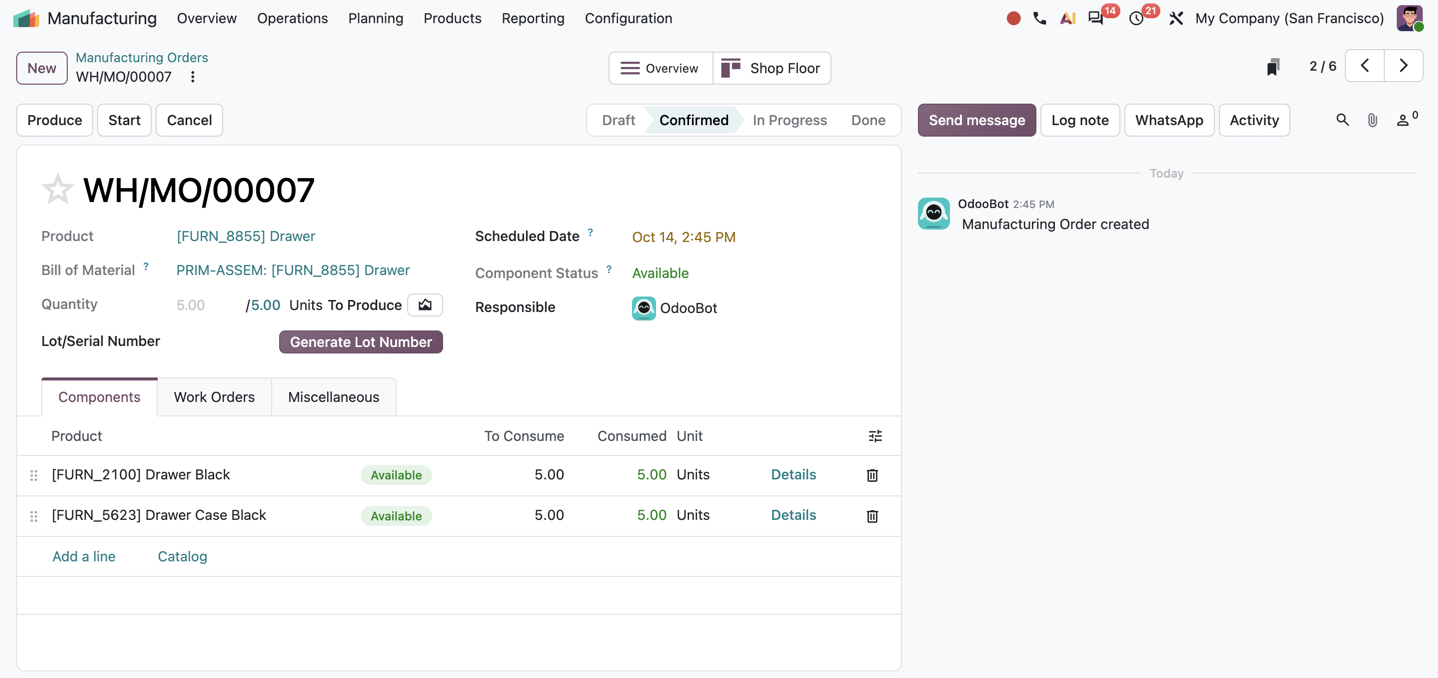
The screenshots in this article come from the owner's Odoo demonstration database used for the Polish MRP article. Products, quantities, people, and dates are demo data. They illustrate the functions, rather than the table order described here. Available features depend on the edition, version, and installed applications.
The Bill of Materials Explains What We Need to Make
How does Odoo know that a table needs four legs? We define it in the Bill of Materials (BOM). For one table, we list one tabletop and four legs, together with any screws, brackets, and other components used in the actual product.
When we create an order for 50 tables, the quantities scale with the order. When we create an order for 100, they scale again. We do not rebuild the recipe for each batch.
The BOM can also describe operations. We specify the work needed, the work centers that perform it, and the expected operation times. This connects the product's material structure with the way it is made.
Material locations and movements depend on the wider production configuration as well: warehouse locations, operation types, and routes. This becomes particularly useful when several work centers pass components and intermediate products through a sequence of operations. Not every movement setting lives inside the BOM itself.
Use the BOM to Understand Planned Manufacturing Cost
A useful BOM also lets us ask what the product is expected to cost. Start with the tabletop, four legs, screws, and brackets. Add the planned operations and the configured work-center and labor rates.
My point about rent, lighting, and utilities is practical: these costs belong in the company's costing method. For example, an agreed allocation can be included in the hourly operating cost of a work center. Receiving an electricity bill does not automatically tell the system how much belongs to each table.
Later, we compare the planned quantities and time with actual consumption and execution. The difference tells us where to investigate: a material price change, extra scrap, a longer assembly operation, or an unrealistic time standard. Odoo documents manufacturing order costs and actual costs.
Missing Components: Connect Purchasing and Subassembly Production
Now we have a manufacturing order. Can we start it? That depends on component availability and the readiness conditions chosen for the process. Some businesses need every component before starting; others can begin the first operation while materials for a later step are still arriving.
If we buy table legs, configured replenishment can prepare a request for quotation in Purchase. Reviewing and confirming the supplier order remains part of the purchasing workflow. If we make a component ourselves, replenishment can instead lead to another manufacturing order.
Supplier records matter here. Supplier A might deliver quickly but require a large order. Supplier B might take longer but accept small batches. Prices, lead times, minimum quantities, and the configured vendor selection must reflect those conditions. This is not a promise that Odoo independently finds the best supplier across every commercial trade-off.
Calculate the Net Shortage for Our 50 Tables
Here is one consistent example. We need 50 tabletops and 200 legs. Existing receipts in the table below arrive before assembly and are allocated to this production, without being counted elsewhere.
| Component | Required | On hand | Reserved elsewhere | Usable stock | Timely receipts | Still needed |
|---|---|---|---|---|---|---|
| Tabletops | 50 | 40 | 10 | 30 | 10 | 10 |
| Legs | 200 | 180 | 60 | 120 | 40 | 40 |
We do not buy another 50 tabletops and 200 legs. We buy the remaining 10 tabletops and 40 legs. We have already excluded reservations from usable stock, so we must not subtract those reservations again. Nor can the same incoming delivery cover two production orders.
The simplified calculation leaves out fasteners, scrap allowances, safety stock, and purchasing multiples. Include those in the real BOM and replenishment policy where applicable. They can change the quantity you actually order.
If a component is a subassembly, give it its own BOM and replenishment settings. The demand for the finished table can then create demand for the intermediate product, which in turn creates demand for its materials. This is the value of a multi-level BOM: we define the structure once and use it through the chain.
Correct Quantities Must Also Arrive on Time
Suppose our agreed shipment date is a Monday. Assembly needs three working days, followed by one working day for inspection and packing. If the assembly center is available Tuesday through Thursday of the preceding week, inspection and packing can take place on Friday. Components must be ready when assembly begins.
We choose to receive and inspect components on the Monday before assembly. If the tabletop supplier needs five working days, we need its accepted order five working days before that receipt date. If the leg supplier needs three, we work backward by three days. Add internal approval time, transport, receiving time, and any safety buffers that apply.
If an existing receipt moves to Thursday, the total quantity may still look sufficient while the production start is no longer feasible. We must change the supply plan, move the work, or discuss a different shipment date with the customer. A supplier lead time is useful only if it reflects how the supplier actually delivers.
Producing for Stock: Manual Orders, Reordering Rules, and MPS
A customer order is only one starting point. A small manufacturer can create production orders manually after a weekly review of stock and expected sales. If the assortment is manageable and the owner understands demand, this can be a sensible first step.
Next, reordering rules can help maintain stock. Define the minimum, target level, replenishment route, and quantity multiple. A purchased component follows the buying route; a manufactured intermediate or finished product follows manufacturing. Manual or automatic triggering depends on the rule configuration.
For example, replenishing in multiples of 50 units is different from holding a minimum stock of 50. One controls the batch quantity; the other sets the threshold. Keeping these parameters distinct avoids surprising production quantities.
For time-phased planning, MPS lets us work with forecast demand, safety stock, and replenishment across periods. Imagine a regular customer placing a larger monthly order or a new distributor increasing expected shipments. We adjust the finished-goods plan and review the resulting component demand.
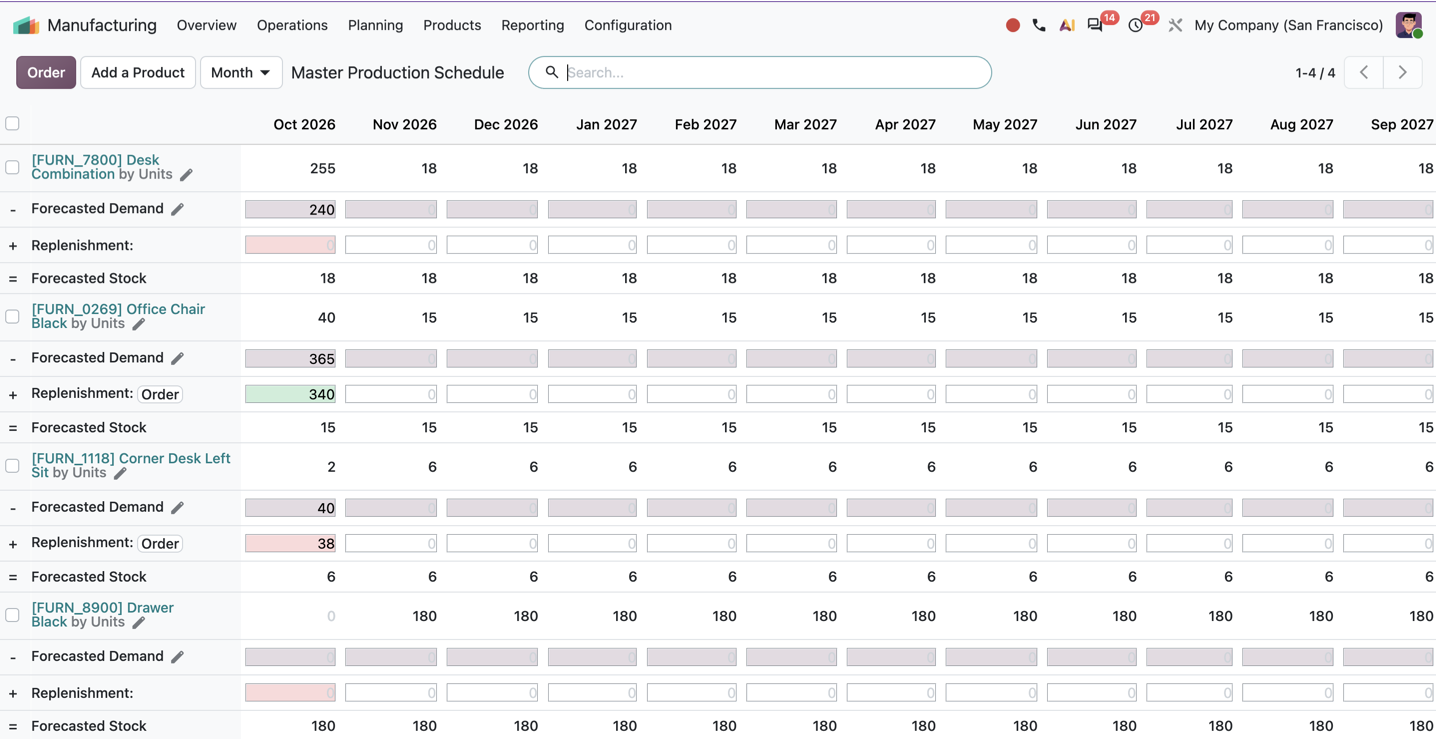
A small business can use a short plan for a few products; a larger business may need a broader planning horizon. The important part is choosing a method the team will maintain. Avoid independently applying MPS and reordering rules to the same product without resolving how they interact. See Odoo's MPS documentation.
Work Centers: Do We Have Time to Make the Order?
Materials are one side of the question. We also need somewhere to perform the work. A work center can represent a machine, assembly station, or defined production area. We assign operations and configure working hours, capacity, expected duration, setup time, and other relevant parameters.
Suppose 18 people work across several production areas. We need to understand which operations each team performs and how much work can be completed in the available time. A work center's product-processing capacity is not simply its employee headcount. Individual shifts, qualifications, and staffing require their own planning decisions.
Work orders and a Gantt view help show which center is occupied, for which production order, and when. If our assembly center is already booked during the three days needed for the tables, purchasing all the legs will not solve the scheduling problem. We need to move the work, use a suitable alternative center, or agree a different date.
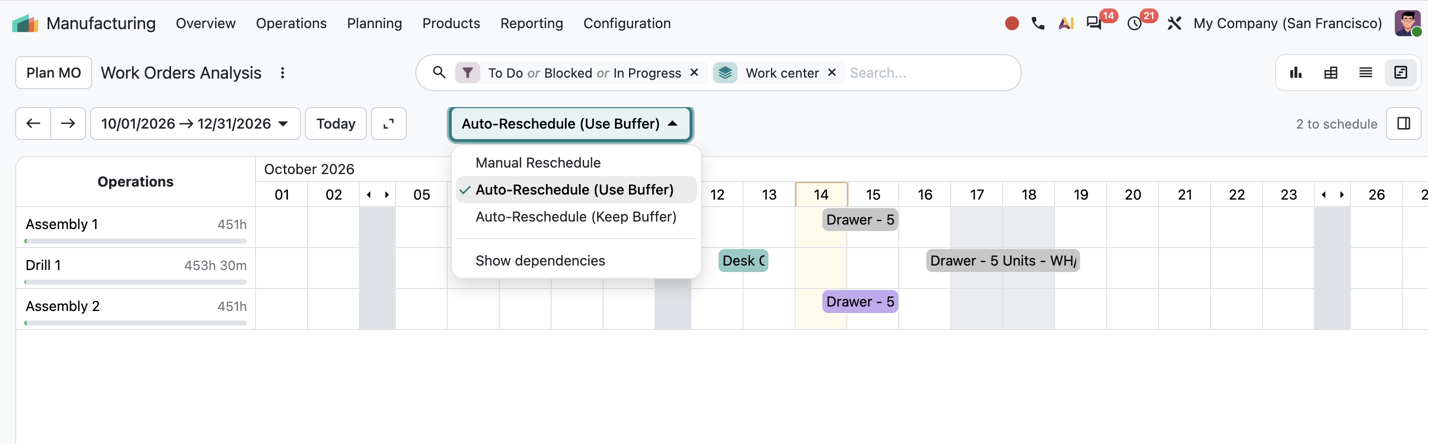
This is where I want the demonstration to become specific. Show the occupied center, move an operation, and explain the resulting dates. Then check material readiness again. Odoo's work-center documentation describes the configuration behind these decisions.
Shop Floor: Give Operators the Information They Need
The operator should be able to work at the station, rather than constantly return to an office to update production documents. In our practice, we recommend a laptop or tablet at the workstation so instructions and execution records are available where the work happens.
Odoo's Shop Floor interface presents work orders and the actions needed to execute them. Operators can view tasks by work center or use their assigned work-order view. Filtering to “My WO” should not be confused with the security configuration that governs access to other records.
Depending on the installed applications and permissions, the process can include starting and completing work, recording consumption, logging additional components or scrap, reporting quality issues, and requesting maintenance. Technical drawings and assembly instructions can be attached to the appropriate operation so employees can consult them during the job.
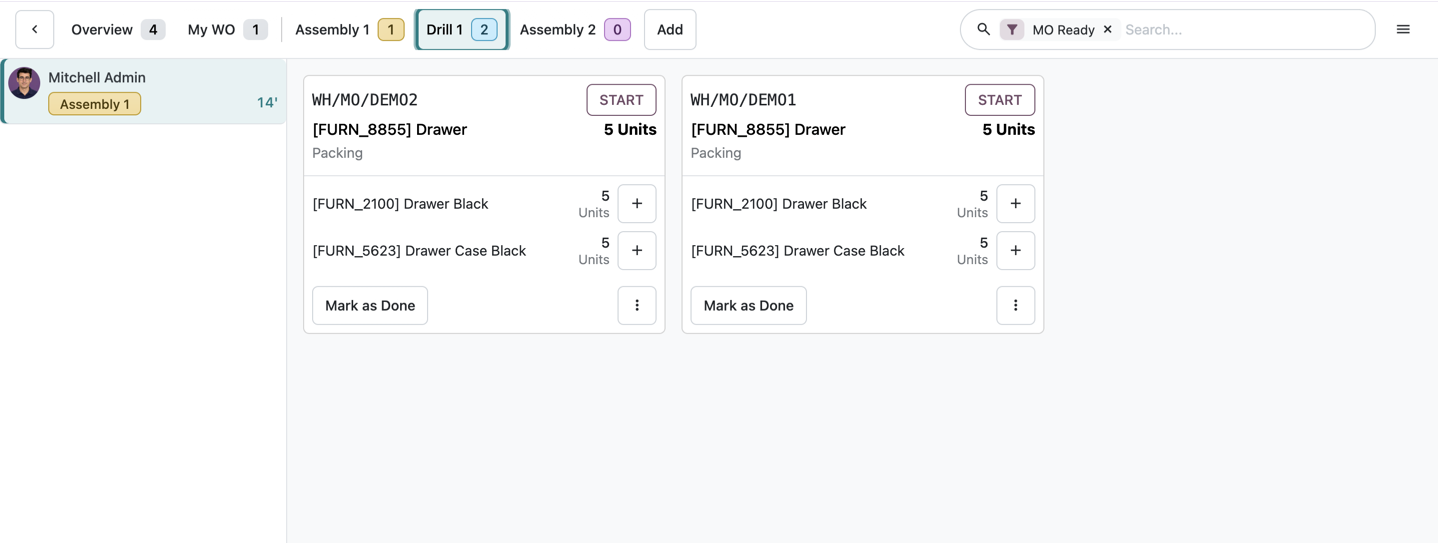
See the Shop Floor documentation for the available workflows. The purpose is a usable execution process: employees know what to do, have the instructions, and record what happened.
Compare Planned Time with Actual Time
Production time recording lets us compare the standard duration with actual execution. We can see where work took place and, with operator identification, who performed it. If an operation consistently takes longer, check the standard, instructions, workstation organization, and reported interruptions.
Recording a blocked work center and its reason can help explain downtime. That is separate from a manufacturing order showing that components are unavailable: one records an execution event, while the other describes material readiness.
These records can also inform employee compensation processes. But recording production time and calculating payroll are different tasks. Before connecting them, we need the company's rules: do employees receive payment per hour, finished unit, operation, or team result? How are rework, rejected units, and shared tasks handled? Those answers determine the configuration or integration, especially for piece-rate pay.
Finish Production, Then Fulfill the Sales Order
Return to our 50 new tables. Once components arrive and the work is completed, we record the actual consumption and output. In the simplified example, that is 50 tabletops and 200 legs consumed to produce 50 tables. If there was scrap or extra consumption, record it rather than closing the order as though the plan happened exactly.
After the required stock movements, inspection, and packing, the 50 new tables join the 50 already available for the customer. We now have the full 100. The delivery linked to the sales order records the shipment.
This is the connection I want an ERP to support: sales demand, available stock, production, component supply, execution, and dispatch. A completed work order is an important step, but the customer still needs the finished goods.
Ten Manufacturing ERP Capabilities Worth Testing
Here are ten capabilities I would turn into practical demonstration questions. For each one, ask the vendor to use your product and order data.
| Capability | What to test with your data |
|---|---|
| Demand forecasting | Change expected demand and explain the resulting production and component requirements. |
| Inventory management | Separate physical stock, reservations, expected receipts, and quantities available for a new order. |
| Production scheduling | Move a delayed operation and show the effect on subsequent work and shipment dates. |
| BOM management | Scale a real BOM to a batch and follow a manufactured subassembly through another BOM level. |
| Capacity planning | Find an overloaded work center and explain the calendars, durations, and staffing assumptions. |
| Supplier management | Compare lead times and quantities, create the purchasing documents, and follow a late receipt. |
| Shop-floor control | Let an operator use instructions, record work, and report a problem at the station. |
| Quality and traceability | Follow a component lot or serial number into finished goods and demonstrate inspection, return, and repair handling. |
| Cost management | Compare planned and actual materials, time, labor, and the agreed overhead allocation. |
| Analytics and reporting | Trace a reported delay or cost variance back to production and inventory records. |
Lot and serial tracking, quality checks, returns, and repairs remain important selection topics. In Odoo, design them with the relevant Inventory, Manufacturing, Quality, and Repairs workflows. Do not assume that a generic “RMA included” checkbox explains the entire authorization, receipt, inspection, repair, and financial process.
Why I Consider Odoo for a Connected Manufacturing Process
The value I see in Odoo is the connection between the applications. Sales creates demand, Inventory gives us availability, Purchase helps secure components, and Manufacturing organizes consumption and output. Work orders and time records then help us understand execution and cost.
For a small or midsize manufacturer, we can start with one product, its BOM, and a manageable replenishment process. Add work-center planning, operator instructions, quality, repairs, and reporting as the process requires. The right sequence depends on the business, rather than a requirement to activate everything at once.
Pricing, usability, and integrations are still important. Evaluate the total implementation scope, let employees try their daily tasks, and confirm the exact connectors and data flows you need. An integration catalog does not prove that your warehouse, carrier, accounting setup, or ecommerce process is already covered without configuration or development.
Good data is equally important. Enter three legs instead of four in the BOM and the calculation for 50 tables will be short by 50 legs. Record 120 usable legs when only 100 exist and the plan relies on missing material. Keep an outdated supplier lead time and the correct quantity may arrive too late.
I would begin the selection with one real order, one BOM, current reservations, and realistic lead times. Ask each vendor to take that example through production, execution, and shipment. That gives you a much more useful basis for choosing than a list of feature names.
At ERPixel, we help configure these Odoo processes and train teams to use them independently. You can explore our Odoo Manufacturing overview and Manufacturing Training for more detail.
What do you manufacture, and where does the process become difficult today? Bring a sample product and order to a conversation with ERPixel. We can discuss the links between sales, materials, production, and the work your team performs.