
Cash flow budgeting plans when money should enter and leave the business. ERPixel’s Cash Flow Budgeting module adds a workflow for planned receipts and payments, budget approval, actual cash movements and forecasts inside Odoo. It supports Odoo 18 and Odoo 19 Enterprise Edition.
Profit is not the same as available cash. A company can issue profitable invoices and still struggle to pay suppliers before customers settle them. A useful cash budget connects amounts with expected payment dates, an owner and the transactions that actually reach the bank.
What standard Odoo already provides
Odoo does more than record accruals. The Odoo 19 financial-reporting documentation includes a Cash Flow Statement and aged receivable/payable reports. Its budgeting documentation also describes analytic and financial budgets. Those existing tools should be part of the assessment before adding a module.
The additional requirement addressed here is a treasury workflow: who expects to receive or spend money, on which date, under which approved plan, and how the recorded cash movement changes the remaining forecast. That is the purpose of ERPixel’s extension; it is not a claim that standard Odoo has no budgets or cash-flow reporting.
| Question | Starting point | Role of the ERPixel extension |
|---|---|---|
| What happened to cash during the reporting period? | Odoo’s Cash Flow Statement and accounting records. | Connect actual movements with the cash categories and budget analysis agreed for the implementation. |
| How do income and expenses compare with budget? | Odoo’s analytic or financial budgets. | Add a separate plan of dated cash receipts and payments where the business needs treasury control. |
| Which planned payments have been approved, paid or remain outstanding? | An agreed cash-management process. | Cash budget documents, approval stages, recorded actuals and revised forecasts. |
Plan cash receipts and payments by date and owner
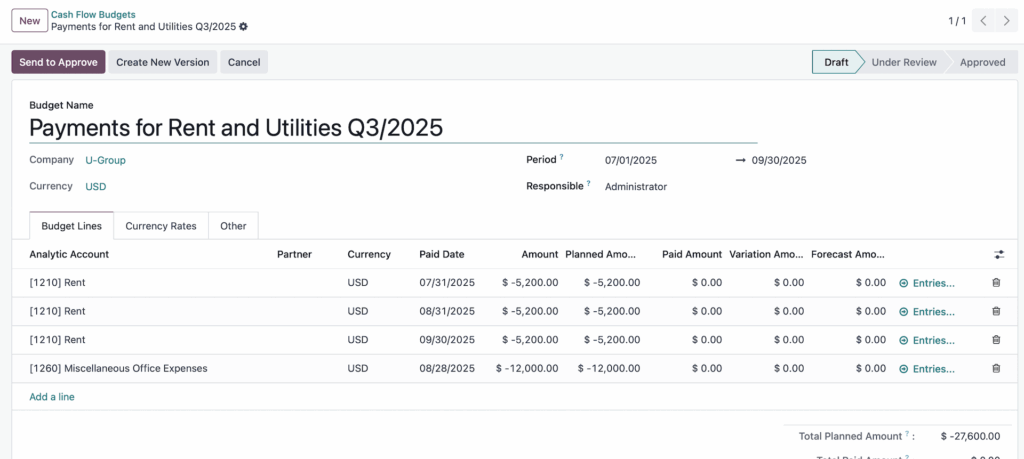
Create a cash budget for a period and assign its owner, department, cost center or project. Plan incoming receipts, outgoing payments or both. Each budget line identifies the partner, amount, currency, expected date and cash-flow analytic account, so a forecast has a clear operational explanation.
- Budget document: name, period, company context, currency and responsible owner.
- Budget lines: planned receipts and payments with the relevant partner, date and analytical classification.
- Multi-currency: lines can use different currencies, with conversion into the budget currency.
- Sign convention: incoming receipts are positive and outgoing payments are negative in the module’s budget lines.
Approve budgets and keep revised versions traceable
The module supports Draft, Under Review, Approved, Rejected and Cancelled states. Managers review the budget before approval, and approved budgets feed the agreed analytical view. The owner and review process make planned spending a business decision rather than another spreadsheet total.
Use Create New Version to prepare a revised plan while retaining a connection with the original. A delayed customer receipt or changed supplier payment date should produce a deliberate forecast revision, not silently replace the plan against which performance is being assessed.
ERPixel has also developed a Payment Request workflow for payment approvals, notifications and traceability, integrated with cash-flow budgeting. Its inclusion and approval rules belong in the agreed implementation scope; approving a request is distinct from executing or recording the bank payment.
Connect recorded bank and cash transactions to actuals
Actual amounts come from bank and cash transactions recorded in Odoo. The module brings these amounts into cash-budget analysis so finance can compare planned and actual movements without maintaining a separate spreadsheet of totals.
During configuration, agree how cash movements are classified and related to budget lines. Test partial payments, date changes, foreign currencies and corrections with the finance team. An invoice or approved request alone should not be treated as proof that money has left the bank.
For a separate reporting requirement, ERPixel’s Direct Method Cash Flow module organizes actual liquidity transactions into cash-flow categories and can integrate with budgeting and Payment Requests. Reporting what happened and planning what remains are connected tasks, but they are not the same deliverable.
A worked example: plan, approve, pay and update the forecast
The original screenshot contains monthly rent lines of US$5,200. The following illustrative calculation uses one such payment amount with an assumed opening cash balance of US$12,000 and a partial payment of US$2,000. It is not a client result or a claim that the screenshot shows these actuals.
| Step | Cash amount | What finance checks |
|---|---|---|
| 1. Create the plan | Planned rent payment: −US$5,200. | Partner, planned payment date, budget owner and cash-flow category. |
| 2. Approve the budget | The agreed obligation remains US$5,200. | Approval authorizes the plan; it is not a bank movement. |
| 3. Record a partial payment | Actual payment: −US$2,000. | Match the recorded transaction to the appropriate budget analysis. |
| 4. Review the unpaid amount | Remaining payment: US$5,200 − US$2,000 = US$3,200. | Confirm that the balance is still due and when it should be paid. |
| 5. Review closing cash | Current cash US$10,000 − remaining payment US$3,200 = US$6,800. | Do not subtract the full US$5,200 again from the already reduced bank balance. |
The forecast closing balance is also US$12,000 − US$5,200 = US$6,800 when calculated from opening cash. Both views agree because the payment is counted once. Real forecasts also include other receipts, payments, timing changes and the agreed treatment of currency differences. This example explains the management check rather than prescribing an undocumented field formula.
Compare plan, actuals, variance and forecast
Pivot analysis can group results by owner, period, department, cost center, partner or cash-flow analytic account. Finance can examine the original plan, actual amounts, variations and forecast together, then investigate the source lines instead of accepting an unexplained total.
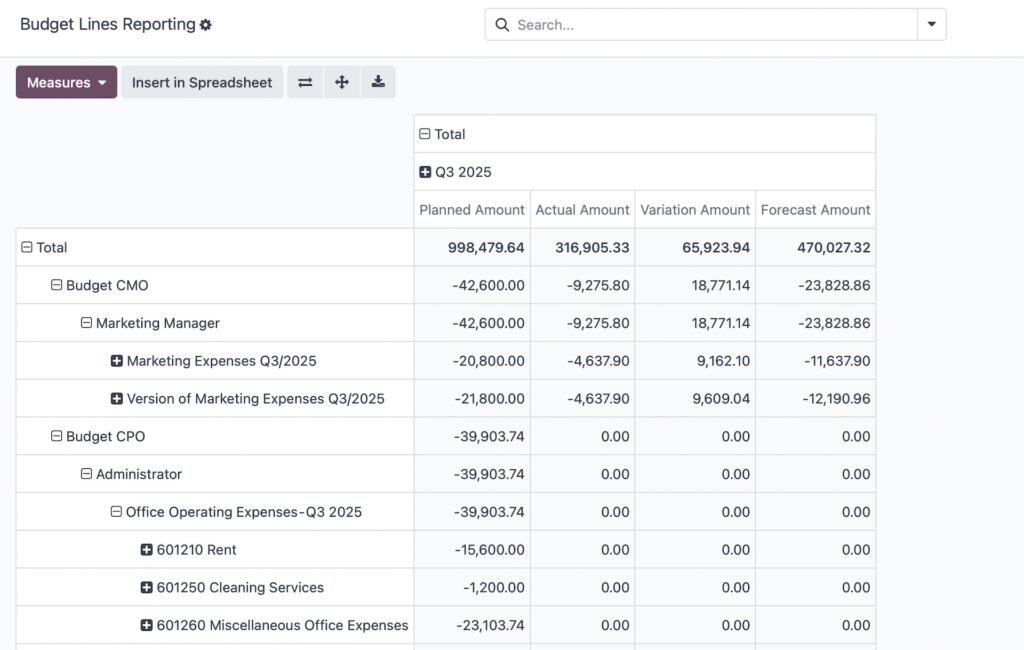
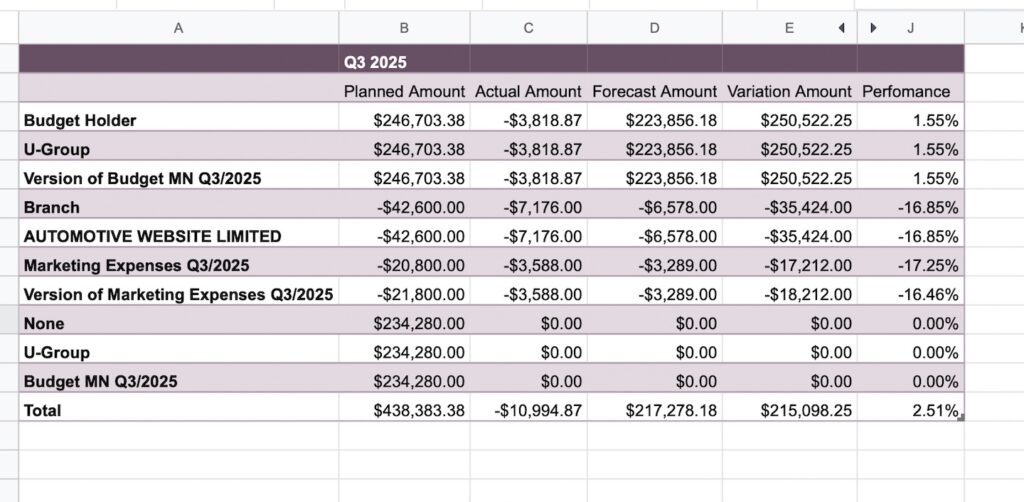
Agree what each measure means before using it for decisions. A higher forecast closing balance is not automatically an improvement: payments may simply have moved into a later period. Delayed receipts can reduce available cash even when planned revenue is unchanged. Review profit alongside cash; our guide to why cash flow is not profit explains the distinction.
Supported versions, hosting and implementation scope
| Item | Current scope |
|---|---|
| Odoo release and edition | Odoo 18 Enterprise Edition and Odoo 19 Enterprise Edition. |
| Hosting | An environment that supports installing custom server modules, such as Odoo.sh or suitable self-hosting. |
| Odoo Online | Not suitable for installing this custom module: Odoo Online does not support custom server modules. |
| Budgeting setup | Agree budget structure, analytical classifications, ownership, approval responsibilities, currencies and opening data. |
| Related ERPixel modules | Specify whether Direct Method Cash Flow and Payment Requests are included in the proposal and how they connect. |
| Delivery and ongoing work | Agree installation, configuration, testing, training, support and future version upgrades in the project scope. |
The standard-feature references above use Odoo 19 documentation; verify the corresponding standard functions on an Odoo 18 project. See Odoo’s documented restrictions for Online and our hosting comparison when choosing where the module will run.
Prepare a cash-budgeting demonstration around your own payment cycle
Bring a representative budget, your approval responsibilities and a sample of recorded receipts and payments. Demonstrate the full sequence: create the plan, approve it, record a partial payment, revise a date and explain the remaining forecast. That is a more useful acceptance test than checking whether a dashboard looks complete.
ERPixel can assess this work through Odoo consulting and implement the agreed workflow through Odoo implementation. For requirements beyond the module’s scope, discuss the specific gap with our Odoo development team.
For the operating process behind these features, read Alexander Koltsov’s cash flow management strategy and seven-jurisdiction implementation example, including payment-date FX rates and a $100,000-to-$110,000 forecast calculation.