
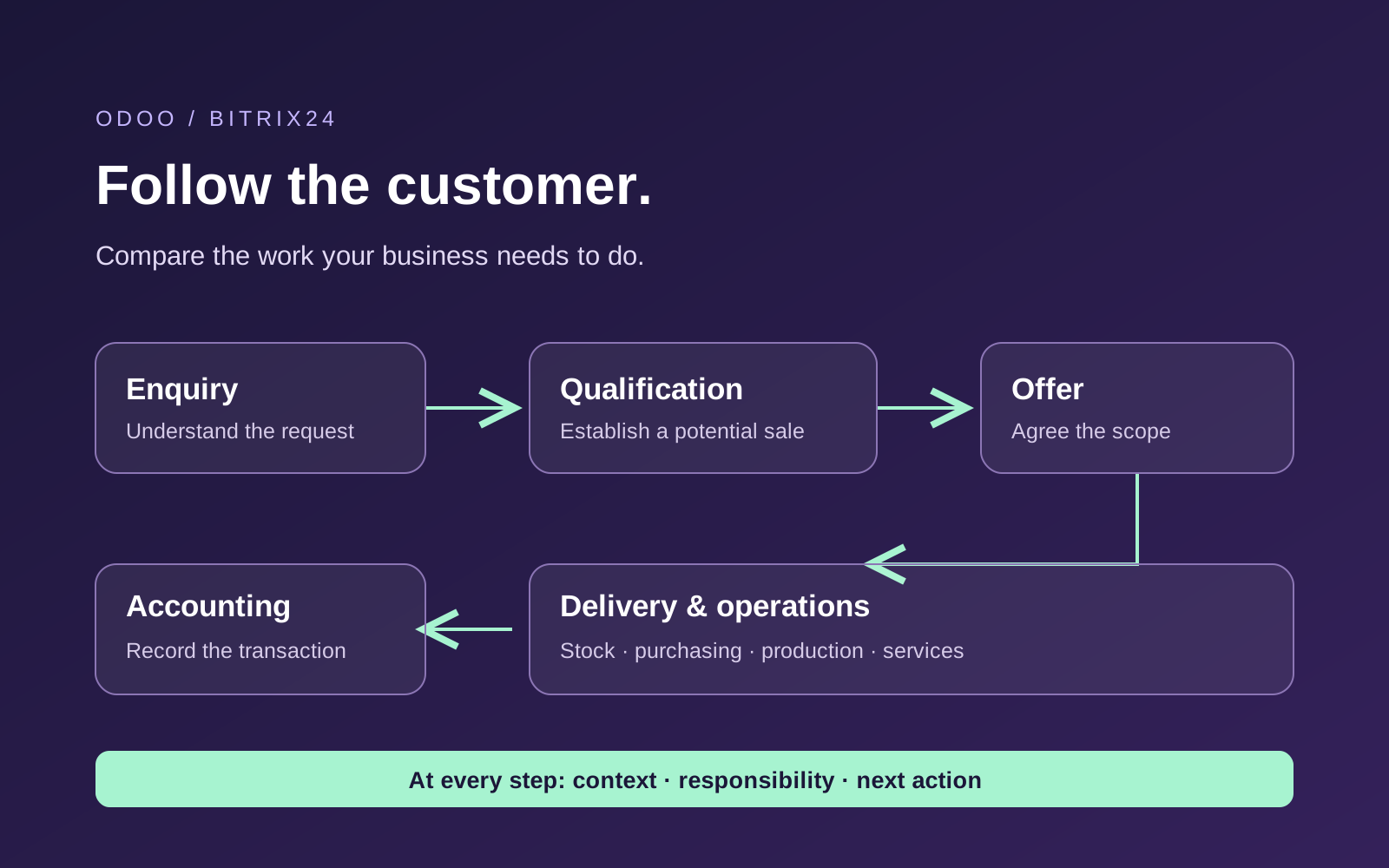
Odoo and Bitrix24 overlap in CRM, but they approach business software from different starting points. Bitrix24 deserves attention when customer communication, tasks and teamwork are the main priorities. Odoo deserves attention when the sales process needs to connect closely with purchasing, inventory, manufacturing and accounting.
That does not mean Odoo becomes useful only after a sale, or that Bitrix24 has no stock management. Both simplifications can lead to a poor decision.
My experience is in using and implementing Odoo CRM. In this guide, I combine that experience with the vendors’ documentation to explain what a beginner should compare. The Bitrix24 assessment is based on its published capabilities; it is not a claim that I have implemented both products.
Product and pricing sources reviewed on 29 October 2026. Subscription examples use the international USD prices displayed during review; local prices and taxes can differ. Hypothetical examples are labelled below.
CRM and ERP: What Is the Difference?
CRM means customer relationship management. It helps a company organise customer information, communication and potential sales: who contacted you, what they need, what you promised and who should act next.
ERP means enterprise resource planning. It connects more of the work needed to deliver what the business sells, including purchasing, stock, production and financial records.
In an illustrative furniture sale, CRM helps the team understand a request for 20 chairs, prepare an offer and follow up. The wider business system helps establish whether the chairs are available, what needs to be bought or manufactured, how delivery will happen and how the transaction reaches accounting.
Odoo includes CRM within a broader application suite. Bitrix24 combines CRM with collaboration and work-management tools. These are starting points for evaluation, rather than rigid boundaries. For more background, read my guide to Odoo, its editions and its wider ERP scope.
Start with Your Customer Process
When a business asks me which CRM to choose, I first want to understand how it works with customers.
Where do enquiries come from? Who responds? What happens if that employee is absent? How does the team distinguish an initial conversation from a realistic sales opportunity?
In my experience of using and implementing Odoo CRM, the system becomes useful when employees can answer five questions:
- Who is the customer, and what do they need?
- What have we already discussed or promised?
- Who is responsible for the relationship?
- What needs to happen next, and when?
- Why do we expect this opportunity to become a sale?
Use those questions in demonstrations of both products. Ask someone to follow a conversation through the system and hand it to another employee. The new person should be able to continue without asking the customer to repeat everything.
I explain this approach in why I recommend considering CRM early in business automation. The implementation team matters too: involve sales, product knowledge, customer service and a business representative who can resolve conflicting requirements.
Leads, Opportunities and Follow-Ups Explained
Consider an illustrative enquiry from an advertisement. Someone asks about your services, but you do not yet know whether their request is relevant or whether they intend to buy. I would initially treat that as a lead.
The salesperson establishes what the person wants, which company they represent, their role in the decision and the intended timing. When the enquiry meets the company’s qualification criteria, it becomes an opportunity: a potential sale worth working through the pipeline.
A pipeline is a view of opportunities arranged by the stages of your sales process. The next step might be a demonstration, a quotation or a conversation with a specialist.
A stage explains where the conversation stands. An activity assigns the next action.
For example, “Waiting for Customer Decision” describes the situation. “Call the customer on Thursday to discuss the offer” gives someone a task and a deadline. In our Odoo work, making that waiting stage explicit has been useful for distinguishing proposals already with customers from work our team still needs to prepare.
My practical Odoo CRM guide explains these records, settings and working rules in more detail. Here, use the same customer journey to compare the proposed setups.
What Should You Compare in Everyday CRM Work?
Bitrix24’s offering combines customer communication with tasks and collaboration. Its published tools include contact-centre channels, telephony, projects and team conversations, with plan-dependent availability. Source: Bitrix24 product and plan comparison.
Our Odoo CRM implementation work includes qualification, sales teams, quotations, forecasting, activity automation, email and call integrations. In configured workflows, an incoming enquiry can be assigned to an employee, trigger a notification and receive an acknowledgement.
These workflows require setup. Capturing phone or WhatsApp communication depends on the corresponding integrations; a controlled handover between teams may require development. Our implementation experience should not be read as a list of features automatically included in every Odoo subscription.
Ask both suppliers to show how a salesperson finds the last conversation, prepares an offer, schedules follow-up and hands work over. Also ask them to identify what is standard, what they configure, which external services are required and what they will develop.
Can You Trust the Sales Forecast?
A colourful pipeline is useful only when its records are credible. An expected closing date that passed months ago needs review. An opportunity without a next action needs an explanation. A lost deal needs a meaningful reason if the company wants to learn from it.
In an illustrative forecast, an opportunity worth €20,000 with a 50% probability contributes €10,000 in weighted revenue. That does not mean the customer will buy half the project. It is a planning calculation across uncertain outcomes.
Ask how managers can identify overdue follow-ups, outdated closing dates and lost deals by reason. Compare conversion rates for a defined group of enquiries over a suitable period: this week’s new leads and this week’s closed deals may concern different customers.
After the Sale: Inventory, Purchasing and Manufacturing
Bitrix24 has inventory management. Its documentation describes recording stock receipts, sales orders, transfers and write-offs across warehouses. Availability depends on the plan. Source: Bitrix24 inventory management.
For straightforward stock tracking, these capabilities may be sufficient. The next question is how the business handles shortages and replenishment.
Odoo documents methods that connect demand with purchasing or production. Reordering rules can suggest or generate orders when stock falls below an agreed level. A make-to-order route can trigger procurement after a customer order is confirmed. Source: Odoo replenishment documentation.
If you manufacture, ask the supplier to demonstrate how a customer order relates to the required components, purchasing and production work. If another system is needed, include it in the demonstration and budget.
The choice depends on the depth of your operations. Test a missing item, partial delivery or changed order rather than assuming that a stock-management checkbox covers your process. My Odoo Inventory guide provides a closer explanation of warehouse operations.
Accounting: An Invoice Is Only One Part of the Process
An invoice asks a customer to pay. Financial accounting also records transactions, reconciles payments and produces financial reports. Do not assume that an invoicing feature replaces your bookkeeping system.
For a concrete country-specific example, Odoo 20’s German localisation documentation describes SKR03 and SKR04 charts of accounts, German reports and DATEV export options. DATEV is relevant to working with German tax advisers. The documentation also distinguishes software tools from the taxpayer’s responsibility for complete, correct records. Source: Odoo 20 German localisation.
Those German capabilities are not evidence that every country’s accounting requirements are covered in the same way. Involve your accountant and test the reports, documents and exports required for your location.
If you retain a separate accounting application alongside either CRM, demonstrate how invoices, credit notes and payment statuses move between them. Establish who resolves discrepancies and maintains the connection.
Pricing: Per User or Per Organisation?
Odoo’s paid plans are generally priced per user; Bitrix24 packages include a user allowance for an organisation. Compare the plans that support your actual workflow.
The international Odoo page reviewed displayed annual-billing prices of US$24.90 per user/month initially, then US$31.10 for Standard, and US$49 initially, then US$61 for Custom. The introductory discount lasts 12 months for initial users. Custom adds options such as Studio, agentic AI, multi-company and external API access. Odoo.sh hosting costs extra. Source: official Odoo pricing.
Bitrix24’s international page displayed annual-billing monthly equivalents of US$49 for Basic with 5 users, US$99 for Standard with 50, and US$199 for Professional with 100. Separate Vibe+ packages have different prices and capabilities. Check their promotional and renewal terms. Source: official Bitrix24 pricing.
These USD figures are a dated reference, not a local quotation. Check currency, taxes, billing period, renewal price and user eligibility before budgeting. For Odoo, ask which people require full or restricted access and whether employee records affect the quotation.
What Does the Complete Setup Cost?
Ask both suppliers for a three-year estimate covering the same scope.
| Cost | What to include |
|---|---|
| Subscriptions | Required plans, user types, add-ons and renewal rates. |
| Implementation | Process decisions, configuration, data migration and training. |
| Integrations | Accounting, advertising, ecommerce, telephony and other systems. |
| Operation | Hosting, AI usage, external services and support. |
| Future changes | Custom-code maintenance, integration updates and upgrades. |
For illustration, five paid users and fifty paid users produce very different per-user subscription totals. A plan covering fifty people may look economical, but only if it provides the required capabilities. Conversely, a broader application suite is not a saving if the company does not need it.
Integration is not automatically a disadvantage. Keeping an accounting system that already works well may be a reasonable choice. Include the actual maintenance and manual work rather than assuming every additional application must be replaced.
AI: Compare the Task, the Result and the Cost
The distinction “Bitrix24 has an assistant; Odoo has agents” is too simple. Bitrix24’s current offering also includes AI agents and an MCP server. MCP is a standard through which AI tools can interact with other software. Source: Bitrix24 tools.
Odoo 20’s release notes describe agents creating records from instructions or files and being invoked by automated or scheduled actions. They also state that AI features require separately purchased IAP credits. Source: Odoo 20 release notes.
An agent can take actions, so permissions, review and a record of what happened matter alongside answer quality. Test both proposed systems with the same sample conversation or document. Compare the resulting summary, suggested next step, record changes and usage cost.
What We Have Implemented Around Odoo CRM
Our experience includes an AI-assisted opportunity-review workflow that combines CRM information, correspondence and available call history. It produces recommendations, determines a next action and creates an Odoo activity with a deadline.
This is an implemented workflow around Odoo, including an automation layer. It is not a promise that installing standard Odoo activates the same process.
Illustrative recommendations include clarifying an unanswered requirement, confirming a buying date or involving a specialist. Customer-provided facts must remain distinguishable from generated interpretations, and employees need a practical way to review the result.
Our AI sales and CRM automation example explains the approach. The point is to make the next customer conversation better informed, rather than add a separate report that someone must manually turn into work.
Hosting, Data and Switching Later
Odoo offers its hosted Online service, Odoo.sh and self-hosted deployment options, depending on the plan. Standard uses Odoo Online; installing custom modules requires a suitable alternative setup. Source: Odoo hosting and plan terms.
For either vendor, ask where your particular account’s data and backups will be stored, which subprocessors and AI providers receive information, how access is controlled and what the contract says about export and deletion. A server location alone does not answer all data-protection questions.
Before committing, inspect a sample export. Contacts and products are only part of a migration. Attachments, communication history, custom fields and relationships between records can also matter.
A CSV export is not proof that another system can reproduce your complete working process. Agree what must be preserved, then test it.
Which System Should You Evaluate First?
The following are illustrative starting points, not universal recommendations.
| Your main requirement | Where to start |
|---|---|
| Customer conversations and teamwork | Evaluate Bitrix24’s CRM and collaboration together; compare Odoo against the same daily tasks. |
| Qualification, follow-up and sales forecasting | Evaluate both. Define ownership, stages, next actions and reporting rules before deciding. |
| Straightforward stock tracking | Test Bitrix24’s inventory capabilities as well as Odoo; demonstrate your real stock movements. |
| Connected sales, procurement and production | Include Odoo early in your ERP shortlist and demonstrate the complete order workflow. |
| Existing accounting works well | Compare keeping and integrating it with the cost and disruption of replacement. |
I would avoid saying that Bitrix24 is automatically better for sales or that every growing company should adopt a broader ERP immediately. Odoo CRM can be useful on its own, while a wider implementation needs a business justification.
How I Would Make the Final Decision
Choose one recurring customer problem and prepare a realistic example. Include the normal flow and an exception, such as a missing item, changed quotation or overdue response.
- Agree on the process. Define the trigger, responsible person, required information and expected outcome.
- Demonstrate it in both systems. Use your example rather than two unrelated sales presentations.
- Separate standard features from implementation work. Record configuration, integrations, development and external charges.
- Let employees try the workflow. Check whether they can find the conversation and complete the next action.
- Compare the complete budget and responsibilities. Establish who supports the setup and maintains it over time.
My starting point is the customer relationship. I want the company to understand its enquiries, follow up consistently, explain its forecast and connect successful sales with the work required to deliver them.
Choose the software after you understand who should act, what information they need and how you will recognise an improvement.
If you would like help assessing your Odoo CRM process, communication integrations or AI-assisted workflows, book a conversation with ERPixel. Bring an example of a customer enquiry or handover that does not work well today.