

Should your Odoo database use independent companies or a parent company with branches? The answer affects how your team manages accounts, exchange rates, reporting, approvals, and access. It is a management decision as well as an accounting decision.
This guide covers Odoo 19. Branches were already documented in Odoo 17; they were not introduced in Odoo 18. Odoo 20 was released in September 2026, so the instructions below remain version-specific rather than a claim to cover the latest release.
What is a Branch in Odoo
A branch is an organizational unit beneath a parent company in Odoo. The standard model suits stores, regional offices, and departments that need local operations within one accounting framework. An independent legal subsidiary is a different concept: Odoo’s documented default is to create it as a separate company.
That distinction does not end the architecture discussion. A holding group may deliberately choose a branch hierarchy for shared management processes, including entities that are legally independent. We discuss the practical advantages and the accounting boundaries below.
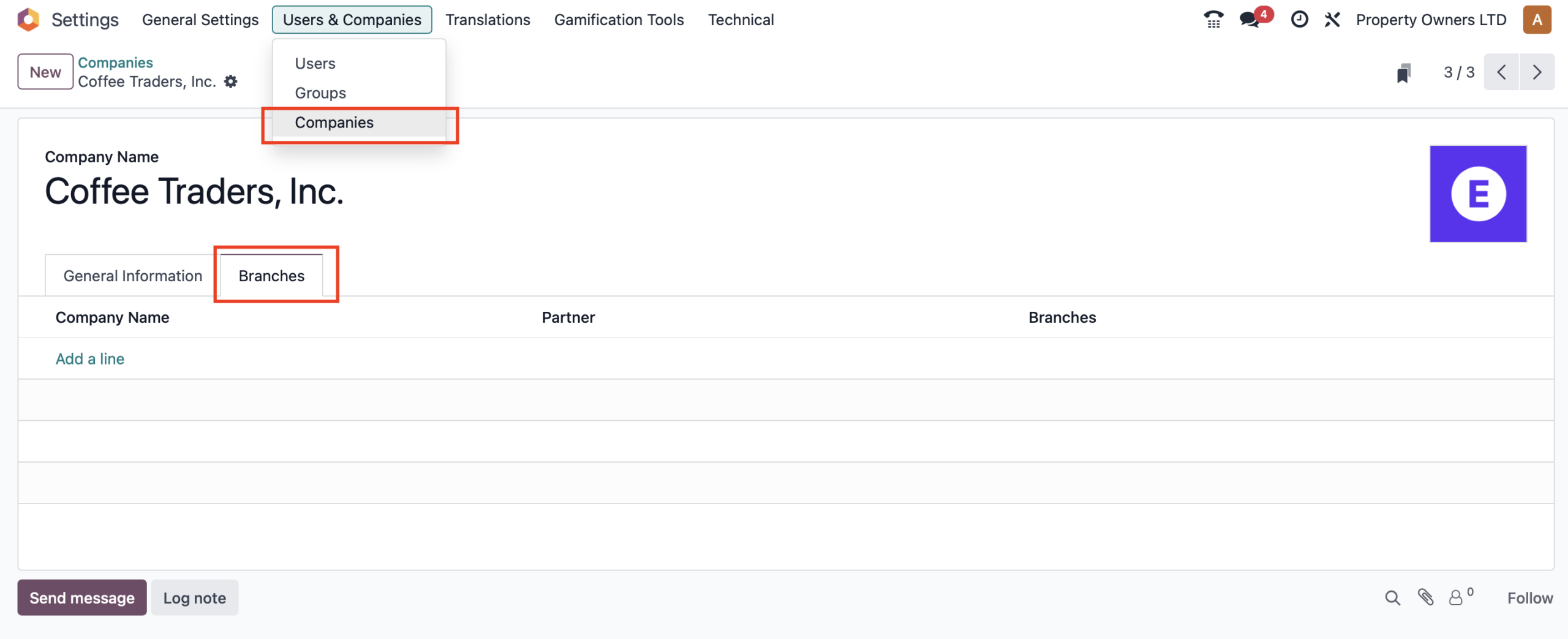
For example, imagine Bloom Group Ltd. in Belgium opening a store in Antwerp. If that store operates within the same accounting framework, a branch lets the team track local activity while retaining common accounting settings.
How Branches Inherit Settings
The parent supplies the shared accounting foundation: the chart of accounts, base currency, and taxes. A branch can have dedicated journals, such as a sales journal or bank journal for its own activity. The common fiscal year also comes from the parent; a branch may close activity earlier using its own lock dates.
Shared accounting is not the same as copying every application setting. Inventory locations, pricing, approval workflows, and other operational configuration still need to be reviewed for each unit.
Visibility and Access
Head-office users can work across the hierarchy when their permissions allow it. Local users can be limited to a branch. The actual view depends on allowed companies, the current company selection, model access rights, and record rules.
Some master data, including contacts and products, may be shared; operational documents normally carry a company or branch. A hierarchy therefore does not mean that every record is either universally visible or completely isolated.
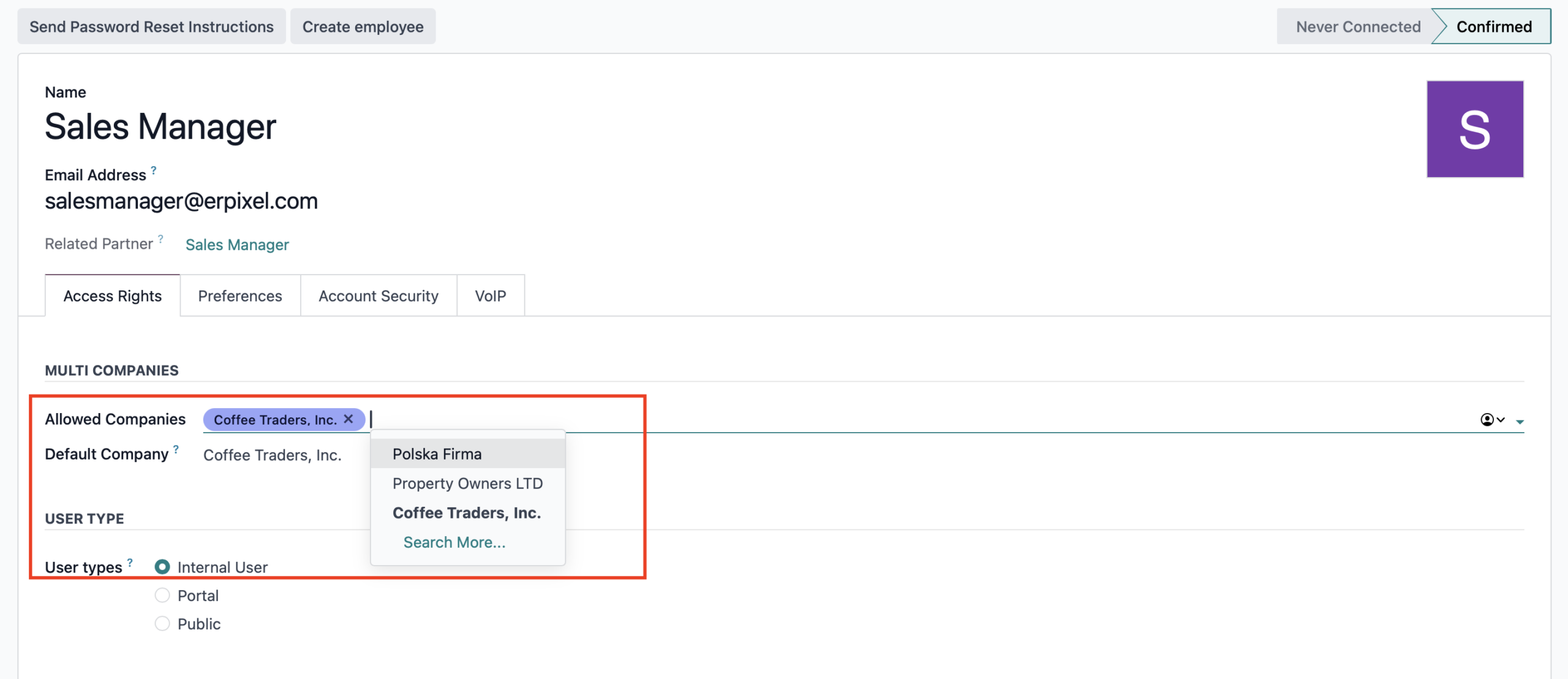
Configure users under Settings → Users & Companies → Users. Test the resulting view with a local manager and a group finance user, rather than relying only on an administrator account.
Geographical Restrictions
Begin with the fiscal localization, base currency, and reporting requirements of each entity. Branches share their parent’s accounting foundation, so a new address alone is not enough to establish whether the model fits.
For international entities that require different local accounting frameworks, separate companies are usually the clearer starting point. A cross-border management hierarchy needs explicit validation of localization and statutory reporting before it can be used for accounting.
Example: A Medium-Sized Retail Business
In this illustrative example, a company named Larixon Classified Ltd. operates in the UK and manages two regional offices:
- Larixon London Branch
- Larixon Manchester Branch
Both branches:
- Use the same UK chart of accounts and VAT configuration.
- Have their own local sales journals and bank accounts.
- Can be included in the parent company’s combined management reports.
Each branch manager can work independently with local data, while the finance department at headquarters has the access needed for group oversight.
Taxes and Fiscal Consistency
Shared taxes reduce repeated configuration, but each entity still needs accurate legal information. A branch may use the parent’s VAT number or have its own, and the reporting structure may require a common or separate return. A different VAT number alone does not automatically settle the branch-versus-company decision.
Validate the actual localization, tax return, and invoice output with the finance team. A common chart of accounts does not remove entity-specific obligations.
Detailed Comparison: Branch vs Separate Company
| Decision | Branch hierarchy | Independent companies |
|---|---|---|
| Accounting foundation | Common parent chart, base currency, and tax setup | Separate configurations; accounts can also be shared or mapped where appropriate |
| Exchange rates | Rates resolved through the root company | Rate policies need coordination across independent roots |
| Management reporting | A common account structure makes aggregation simpler | Group reporting needs aligned accounts and reporting policies |
| Legal-entity consolidation | Shared settings do not eliminate consolidation adjustments | Requires a designed consolidation process |
| VAT registration | May be shared or separate, subject to localization | Configured for each company |
| Access | Hierarchy can simplify head-office oversight; local permissions still apply | Users receive access to the companies they need |
| New entity | Reuses the common accounting foundation; operational setup remains | More independent setup and policy coordination |
| Best starting point | Units that benefit from one accounting and management framework | Entities requiring independent accounting frameworks |
When to Use a Branch
Consider branches when the business wants centralized accounting, local operational responsibility, and group-level oversight. Retail chains, regional service offices, and project divisions are typical examples.
The same structure can also be attractive to a holding group with independent legal entities. The practical question is whether the benefits of shared configuration fit the group’s accounting and operating requirements.
A Holding Group: Five Practical Advantages
In our implementation approach, legal independence is not a reason to dismiss branches without examining the management model. A holding group can gain directly from organizing compatible entities beneath one root:
- Simpler accounting aggregation. The common chart of accounts is already in place. The team spends less time aligning separately maintained account structures before reviewing group results. Formal consolidation may still require eliminations and adjustments.
- One source of exchange rates. Branches resolve currency rates through the root company in Odoo 19. This gives finance a common rate basis instead of maintaining potentially inconsistent rate tables across independent companies. Transaction dates and any statutory translation policy still matter.
- A holding-level workspace for financial decisions. Budgets, planned expenditure, and payment requests can be discussed at holding level before an operating legal entity is assigned to execute them. This makes the management sequence explicit: request, discussion, approval, assignment, execution.
- Less friction with company switching and access. A hierarchy can make oversight easier for people working across the group and reduce repeated access administration. Local managers still need appropriate restrictions, and company-dependent documents must be created in the correct context.
- Easier onboarding of another entity. The new unit reuses the common accounting foundation rather than starting from a separate configuration. The team can focus on its legal details, journals, bank accounts, users, and operational differences.
Example: Approve at Holding Level, Execute Locally
Imagine that an operating company requests payment for new equipment. The request first goes to the holding’s finance team, where it is discussed against the budget and planned cash outflow. After approval, the designated operating entity handles the supplier bill and payment. Management retains the decision history and can see who approved the expenditure and which entity executed it.
This is a workflow to design using suitable applications or custom development. Creating a branch does not automatically provide payment-request routing, budget discussions, or a safe transfer of documents between entities. Keep the approval request linked to the execution documents; do not simply change the company on a posted invoice or payment.
Architecture boundary: Odoo documents independent subsidiaries as separate companies by default. Using branches for such a group is a deliberate implementation choice, not a change in the entities’ legal status. Before adopting it, verify entity-level books, invoice identity, VAT returns, localization, audit trails, and intercompany transactions. If those requirements cannot be met, retain independent companies and implement the holding-level approval workflow across them.
When to Use a Separate Company
Prefer independent companies when an entity requires its own accounting framework, base currency, fiscal calendar, or localization, or when the branch model cannot support the required separation and reporting.
A separate legal entity is the documented default for an independent subsidiary. Evaluate the holding scenario above on its concrete requirements rather than treating either structure as universally better. Where entities trade with each other, configure and test the relevant intercompany workflow.
Managing Branches in Odoo
For Odoo 19, start with the parent company:
- Open Settings → Users & Companies → Companies (or Manage Companies in Settings).
- Open the intended parent and use Add a line in the Branches tab.
- Enter the branch’s legal and contact information.
- Review journals, bank accounts, operational settings, and user access.
- Test a complete workflow: transaction entry, approval where applicable, payment, branch reporting, and the parent view.
Adding branches enables multi-company functionality. For Odoo’s hosted subscriptions, check the applicable plan before changing the structure: multi-company can require the Custom plan. Branches are not a workaround for subscription requirements.
Odoo 19 Multicompany: Official Documentation
Use the versioned sources when checking a particular setup:
- Odoo 17 companies and branches — confirms that branches predate version 18.
- Odoo 19 company structure — hierarchy, access, and configuration.
- Odoo 19 accounting — branch accounting and VAT.
- Odoo 19 multi-company — company selection, shared records, and subscription implications.
- Odoo 19 currency implementation — root-company exchange rates.
- Official Odoo builds — release versions, including Odoo 20.
Consolidation and Reporting
Two reporting tasks deserve separate names. A parent-and-branch view aggregates activity within the hierarchy. Financial consolidation of independent legal entities also needs a defined scope, consistent policies, and the relevant eliminations and adjustments. A convenient parent report alone does not complete that process.
In Odoo 19, account mapping, multi-ledgers, company selection, and horizontal groups support consolidation. Multi-ledgers define journal scope; they do not automatically establish IFRS or local GAAP compliance. See Odoo’s consolidation guide.
For a holding group, start by agreeing what management wants to see: local operating results, a combined management view, or statutory consolidated statements. The shared chart and exchange-rate source make preparation easier, but the report still needs to match that purpose.
Summary
Branches are useful when a group benefits from a shared accounting foundation and a clear management hierarchy. Their practical value extends to easier account alignment, a common exchange-rate source, holding-level financial approvals, smoother access administration, and faster entity onboarding.
Independent companies remain appropriate where accounting frameworks or entity separation require them. For a holding with independent legal entities, compare both models against the real approval, accounting, and reporting workflows before committing to the structure.