
By Alexander Koltsov, ERPixel
Today, I want to explain how landed costs work in Odoo. Before looking at the document and its settings, we need a clear definition, because the accounting principle matters as much as the software mechanism.
In practical terms, landed costs are additional costs associated with acquiring inventory. In Odoo, the Landed Costs mechanism lets us add qualifying costs to the value of goods the company has received from suppliers or produced through manufacturing.
The mechanism itself is fairly simple. The important questions are how we allocate the costs, how we know that every charge has been included, and what happens when the invoice arrives after the goods have already been sold or consumed.
What are landed costs under IFRS?
The relevant IFRS standard is IAS 2 Inventories. It defines inventory cost more broadly than the supplier’s selling price: cost includes purchasing expenditure, conversion expenditure and other costs necessary to bring inventory to its current location and condition. See the IFRS Foundation’s overview of IAS 2.
Purchase costs include import duties, non-recoverable taxes, transport, handling and directly attributable acquisition costs. Recoverable taxes are excluded, and discounts reduce purchase cost. Storage is generally excluded unless necessary between production stages. General administration and selling expenses do not automatically qualify. These boundaries are explained in IAS 2, paragraphs 11–16.
That distinction matters for temporary storage as well. We should assess the substance of the charge and the applicable accounting policy, rather than assume that every invoice connected with a container can be capitalized.
In Odoo, Landed Costs is the document-based mechanism for assigning those qualifying additional costs to selected inventory operations. The feature supports the accounting process; selecting a service product does not, by itself, establish that the expense qualifies under IFRS.
The purchase price may be only the beginning
Suppose you receive 100 units at €10 each. The goods initially cost €1,000. You then receive a separate invoice for €200 of eligible additional acquisition costs.
If those costs are distributed evenly across the 100 units, each unit receives another €2 of cost. The resulting value is €1,200, or €12 per unit. For this simple example, assume all the goods remain in stock and there are no other adjustments.
The quantity has not changed. What has changed is the cost attached to the goods.
Real purchases can involve freight, customs handling, duties, insurance and other qualifying services. The supplier invoice for the goods therefore does not necessarily complete their cost.
My previous article explains how Odoo Inventory works: warehouses, locations, receipts, transfers, reservations and stock movements. Here, I want to concentrate on the value associated with those operations. The Odoo Inventory application and Odoo Accounting need to support the same, explainable cost history.
Where to find the Landed Costs document
Odoo has a dedicated document named Landed Cost. You can access it under Inventory → Operations → Landed Costs and create a document manually.
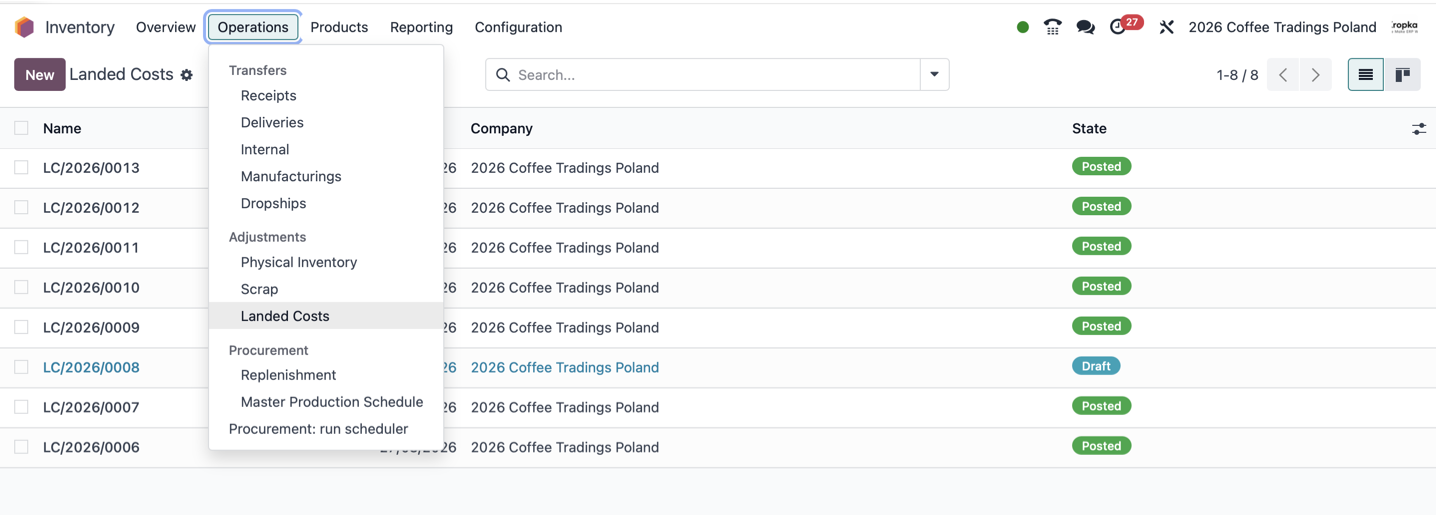
In the workflow we normally implement, however, creating an isolated manual document is not the starting point. The process begins with a supplier invoice. A carrier bills you for delivery, a customs agent invoices you for services, or another supplier charges you for qualifying handling or production work.
Start with a vendor bill and the right service product
The important detail is the product selected on the vendor bill. For recurring landed cost charges, we create dedicated products with the Service type. On the product’s Purchase tab, the Is a Landed Cost option identifies the charge, and a default split method specifies how it should be allocated.
When a vendor bill contains eligible landed cost lines, Odoo provides an action to create the landed cost document. The supplier charge and its allocation remain connected. The document still needs the correct target operations and a reviewed calculation. The standard workflow is described in Odoo’s landed costs documentation.
For the wider relationship between supplier invoices, receipts and accounting, see our article on vendor bills, stock valuation and purchase order matching in Odoo.
How to divide one freight invoice between different products
Imagine a container carrying boots, jackets, hats and snowboard equipment. All those different products travel together, and the freight invoice is €2,000.
How much of that €2,000 should be added to each SKU? One product may be expensive and compact. Another may be inexpensive but take up a great deal of space. The quantities may differ substantially as well.
Odoo provides five standard split methods:
| Split method | Allocation basis |
|---|---|
| Equal | The same amount for each eligible valuation line. |
| By Quantity | Each line’s share of the total quantity. |
| By Current Cost | Each line’s share of the original value used in the calculation. |
| By Weight | Each line’s share of the total weight. |
| By Volume | Each line’s share of the total volume. |
Equal and By Quantity are different. Equal divides the charge between valuation lines; By Quantity allocates according to the quantities on those lines.
In our practice, we often recommend By Current Cost. More valuable goods receive a larger share of the additional cost. For a mixed container, I find this a useful and understandable starting point.
It is not automatically the most accurate basis for every charge. If transport is priced by weight, weight may better explain the expense. If space is the main factor, volume may be more appropriate. Those methods also depend on reliable weight and volume data in the product catalogue.
The basis should reflect the charge and be applied consistently, rather than be selected simply because it produces the preferred margin.
Select the receipts and check the computed values
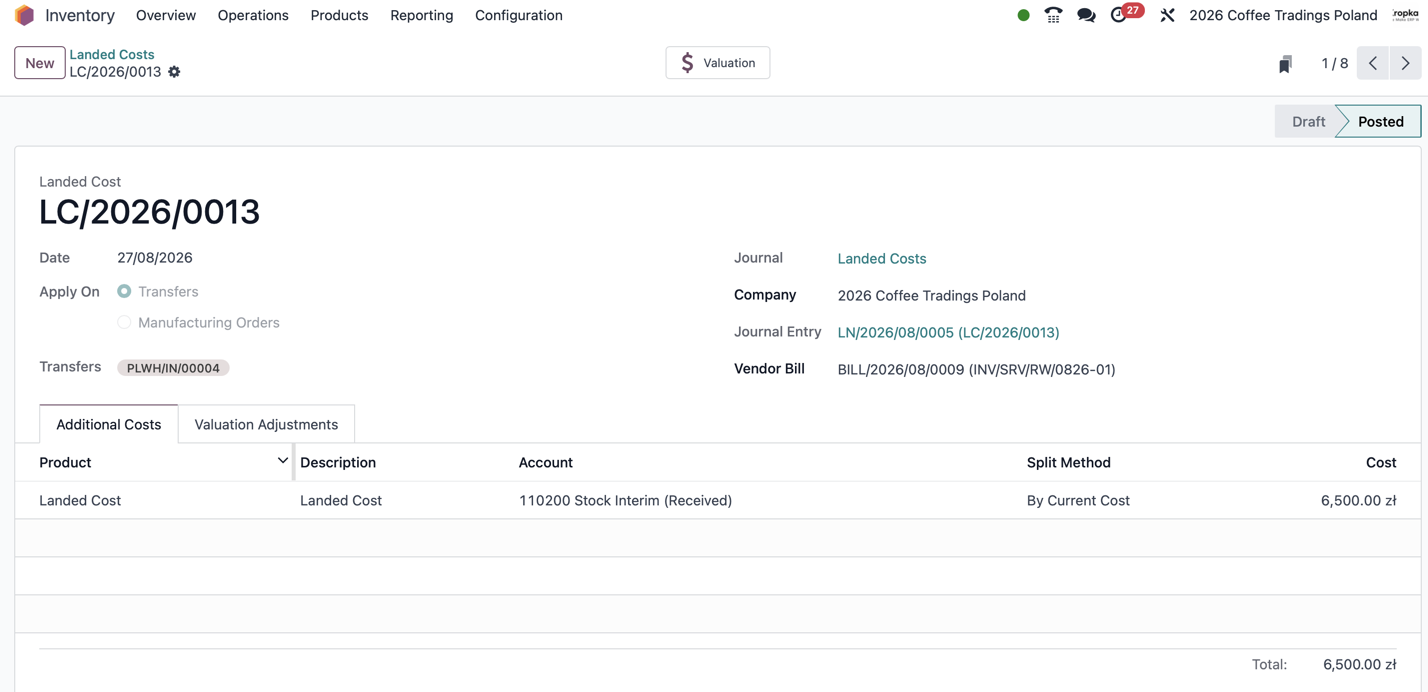
The landed cost document must identify the inventory operations to which the additional charges belong. For purchased goods, select the relevant receipt or receipts in the Transfers field.
You are adjusting the value associated with the movements through which the goods entered inventory. You are not simply increasing an unrelated number on a product record.
One document can cover several receipts. This is convenient when a single freight invoice covers several containers or deliveries. The underlying receipts must represent the goods to which that charge actually relates.
The standard calculation requires eligible inventory products using FIFO or Average Cost (AVCO). Accounting entries also depend on the valuation configuration.
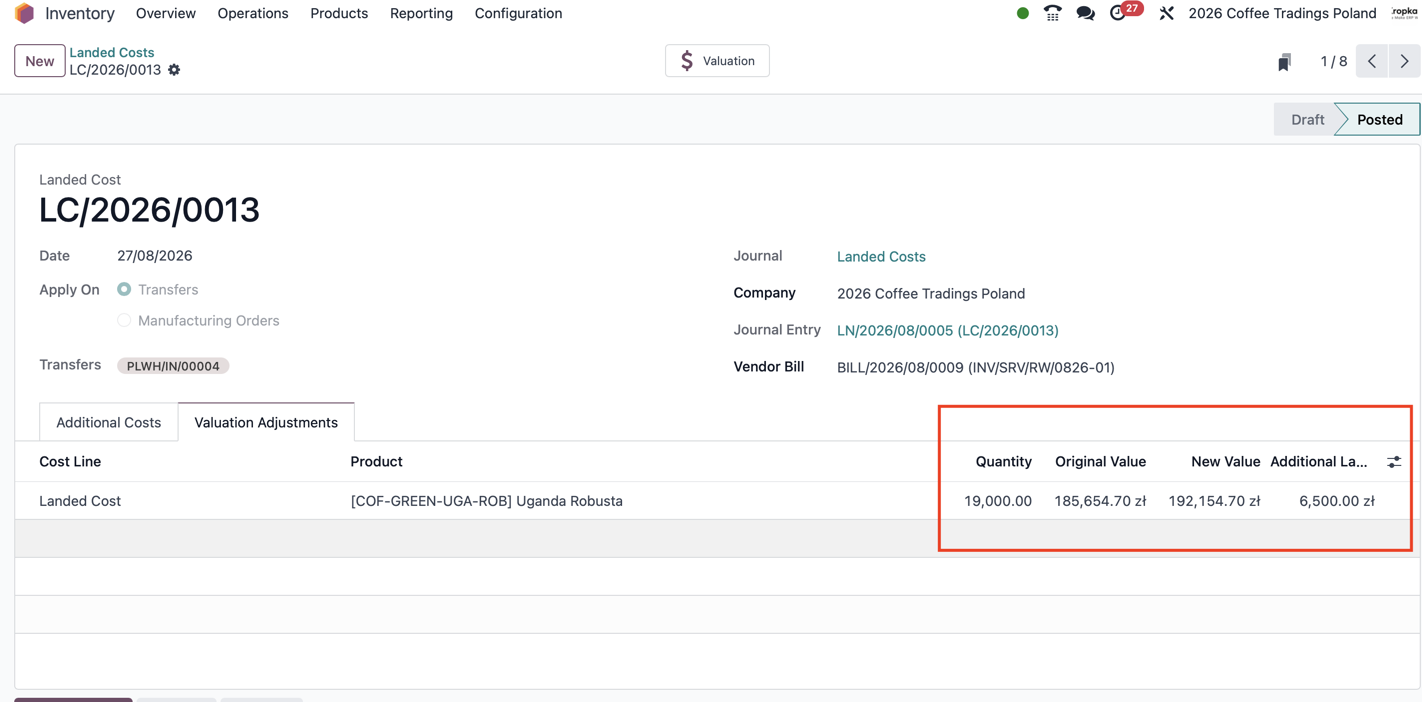
Click Compute and review the valuation adjustments. Odoo shows the original value, the additional landed cost and the new value. You can check the calculation before you validate it.
In the example shown in this article’s cover image, the selected receipt contains 19,000 units. Its original value is 185,654.70 PLN. Adding 6,500 PLN gives a new value of 192,154.70 PLN.
The useful reconciliation is straightforward: the qualifying additional charge in company currency must match the total allocated to the selected goods, including rounding. A correct invoice amount assigned to the wrong receipt still produces incorrect costs.
Landed costs for manufacturing orders
The same mechanism can also be used for manufactured products. With the relevant manufacturing integration installed, Odoo allows the document to target Manufacturing Orders rather than transfers. This is supported by Odoo’s manufacturing landed cost integration.
Additional costs in manufacturing may include qualifying delivery of materials to your plant or to a production contractor, or external production services that belong in the cost of the finished goods.
The mechanics are familiar: record the vendor bill for the service, create the landed cost document, choose the manufacturing order as the target, compute the allocation and review it before validation.
There is an important distinction in selecting the target. If freight belongs to acquiring raw materials, the appropriate target may be the material receipt. If a service belongs directly to producing finished goods, the manufacturing order may be appropriate. We also need to avoid counting a service twice if another manufacturing or subcontracting process already includes it.
The purpose is to assign the additional cost to the correct inventory and reflect the appropriate accounting effect. Our article on Odoo manufacturing accounting explains the broader costing process, while the Odoo Manufacturing page describes how production connects with inventory and finance.
Landed costs are calculated in the company currency
Supplier invoices may arrive in different currencies. Inventory valuation and landed cost allocation are expressed in the company’s currency.
If your company keeps its books in US dollars and buys goods or services in euros, both the inventory value and the qualifying additional costs must be represented in dollars for the allocation.
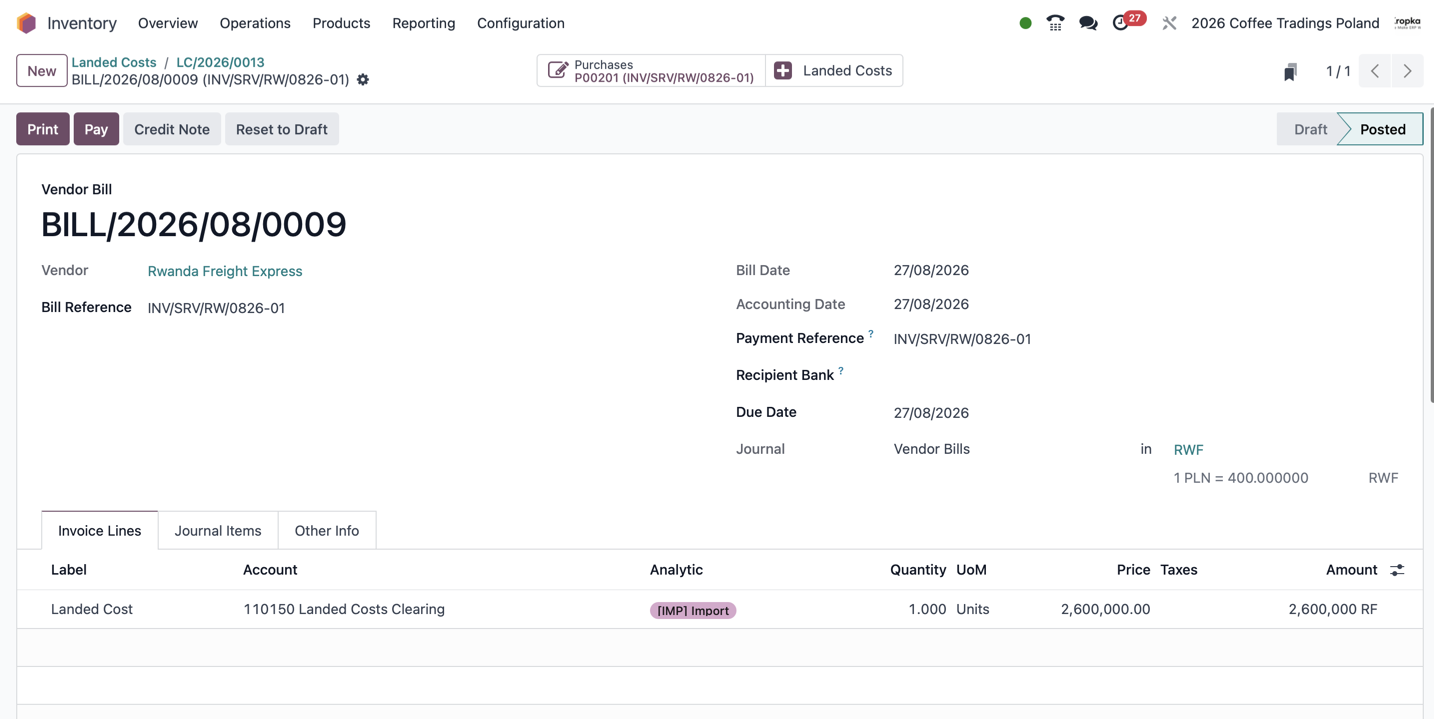
The screenshots provide a practical example. The freight bill is 2,600,000 RWF. At the displayed rate of 400 RWF per PLN, the corresponding company-currency amount is 6,500 PLN. That is the amount allocated through the landed cost document.
Always compare amounts in the same currency. Check the converted amount and the exchange-rate basis used in the accounting documents.
Vendor Bill and Landed Cost: the accounting entries
I recommend a dedicated Landed Cost Clearing account. It lets us identify supplier charges already recorded but not yet allocated to inventory.
For the example shown here, where the charge is allocated to goods remaining in stock, the entries are:
| Document | Debit | Credit | Amount in this example |
|---|---|---|---|
| Vendor Bill | Landed Cost Clearing | Accounts Payable | 6,500 PLN |
| Landed Cost | Stock Valuation | Landed Cost Clearing | 6,500 PLN |
The vendor bill records the liability to the supplier and places the qualifying charge on the clearing account. The landed cost allocation then transfers it from clearing into inventory value.
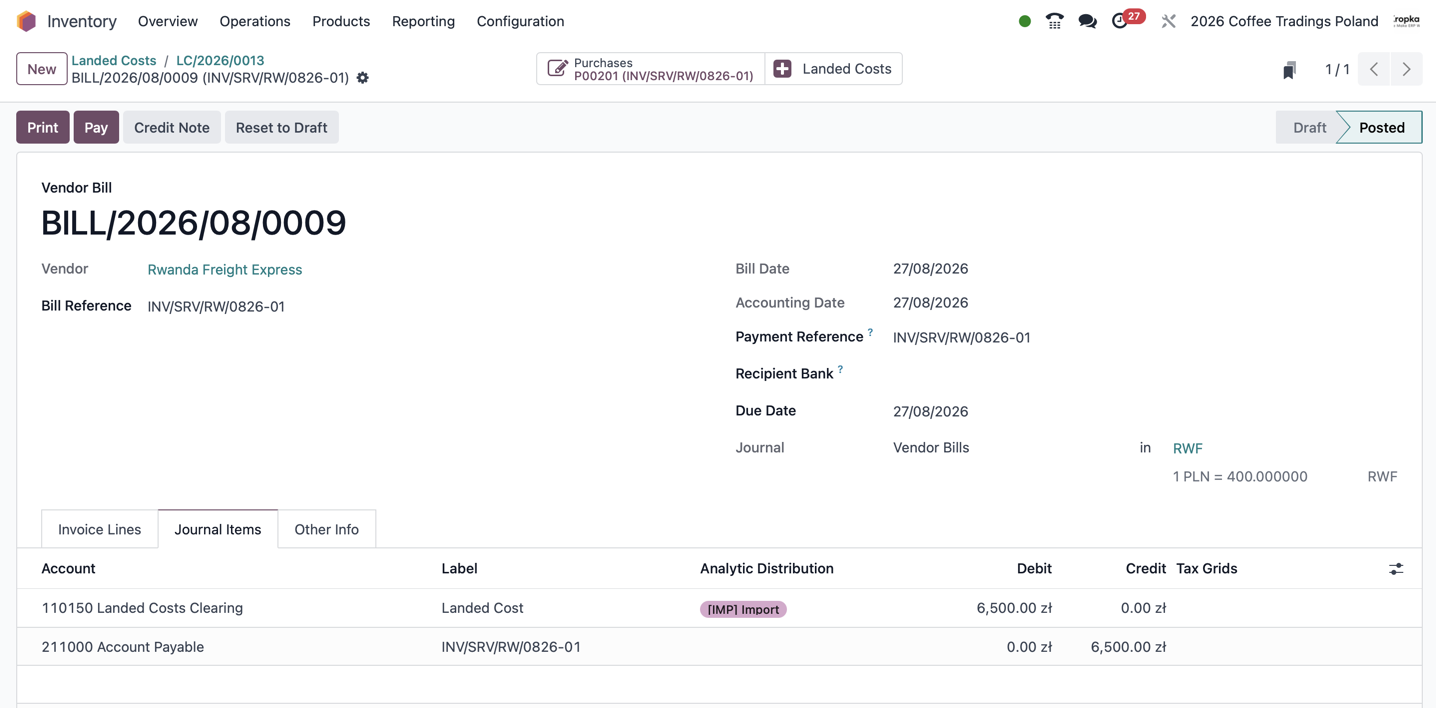
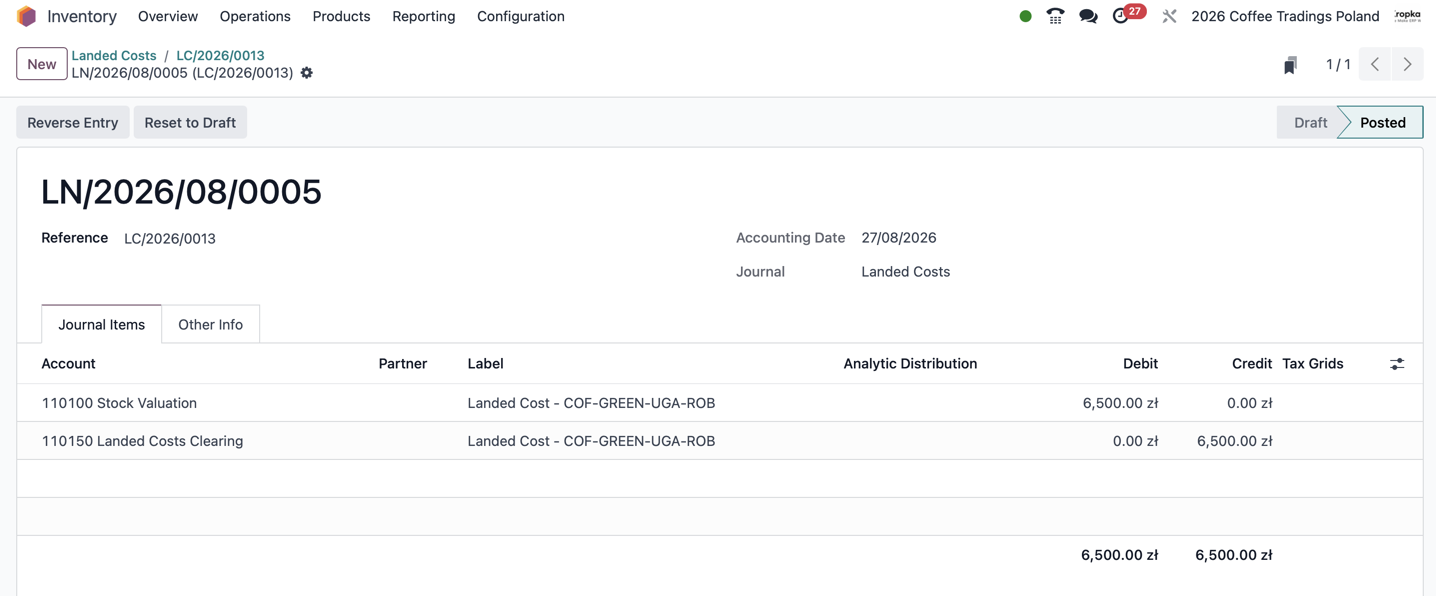
This is the flow demonstrated in these screenshots. The exact accounts and entries must match the Odoo version, valuation settings and localization. Charges related to goods already sold or consumed require separate attention.
Different product categories can use different Stock Valuation accounts
The Stock Valuation account does not need to be the same for every product. You can configure different inventory valuation accounts on product categories.
This lets you separate components from finished goods in the accounts. You can also distinguish accessories from the main products you sell.
For example, components, finished products and accessories can each have their own category and Stock Valuation account. The allocation can then follow the accounting configuration of the products in the selected receipt or manufacturing order.
This makes the balance sheet easier to interpret and helps the accountant reconcile the value of different inventory groups. For the wider process of reviewing entries, see our article on Odoo accounting journals and journal entries.
Use the clearing balance to find unallocated costs
The clearing account provides a useful control. A supplier bill may already be posted while the landed cost document remains in draft. In that situation, the charge has entered accounting, but its allocation has not been completed.
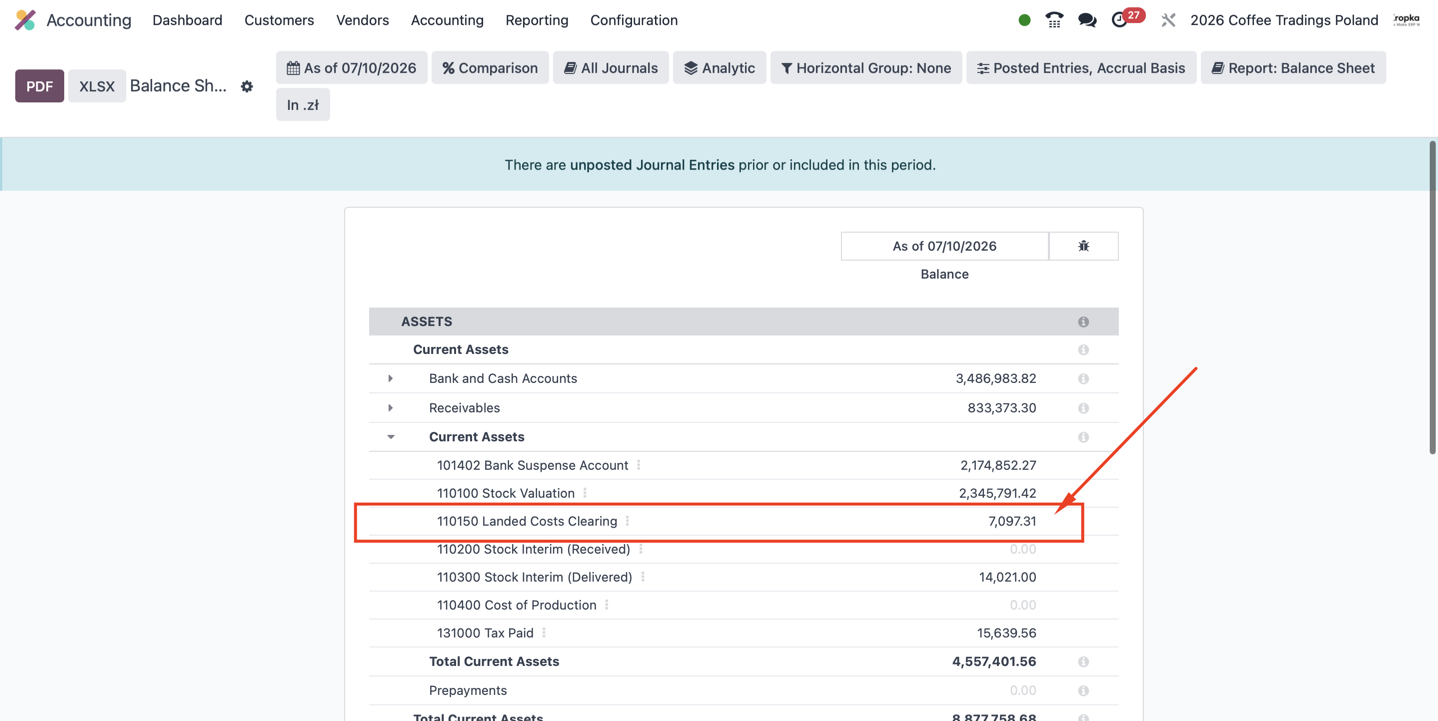
In this balance sheet, Landed Costs Clearing shows 7,097.31 PLN. That balance is a signal to investigate. It does not, by itself, prove an error or identify a single unprocessed bill.
Perhaps a landed cost is still in draft, only part of a charge has been allocated, or an adjustment needs reconciliation. The aim is to trace each supplier charge through to its allocation and explain any remaining amount.
Odoo 19 changed important aspects of inventory accounting. For the broader distinction between operational valuation and accounting, see our article on the Odoo 19 inventory valuation model.
Product setup is simple; staff discipline matters
We usually create a product category named Landed Cost Products and place the relevant Service products inside it. That category organizes the catalogue; it does not activate the mechanism by itself.
The individual products need the landed cost option, suitable default split methods and the right accounting configuration. The inventory settings also need to support the process.
You might prepare service products for freight, customs handling, insurance and external production services, where the costs qualify for capitalization. Temporary storage needs the accounting assessment discussed earlier.
Then agree a practical rule with the team: when entering those supplier bills, always choose the designated products from the catalogue.
If an employee selects a generic service product instead, the intended landed cost workflow may be missed. A small, clearly explained list of products is often enough to make the process convenient and reliable.
Validate carefully: a posted document cannot simply be cancelled
Once a landed cost document is validated, standard Odoo does not allow cancellation through the ordinary cancellation action. It provides for negative landed costs as a reversal approach, but the correction still needs review against later movements and accounting consequences.
Check the charge, target documents, split method, currency and calculated values before posting. Taking a moment to review them is much easier than explaining a correction later.
For goods remaining in inventory, the additional cost becomes part of their valuation. Subsequent sales and consumption then use that cost according to the costing method. The feature adjusts the cost associated with the selected operations, rather than assigning the expense indiscriminately to every future purchase.
What happens when goods have already been sold or consumed?
The goods arrive, the warehouse dispatches them, and some materials may be consumed in manufacturing. Only afterwards does the freight bill reach the accountant.
The additional charge now belongs partly or entirely to goods that no longer remain in their original form or location. This is where a simple workflow can become a complicated costing problem.
It would be too broad to say that standard Odoo cannot handle goods already out of stock. Odoo 18 includes accounting adjustments for quantities already issued. Odoo 19 has different valuation and accounting logic, so the result needs checking in the actual configuration. The relevant behavior can be examined in the official Odoo 18 and Odoo 19 landed cost implementations.
My practical recommendation remains the same: allocate landed costs promptly and verify the treatment of late charges. A posted document alone does not establish that every downstream margin or manufacturing cost has been corrected as intended.
In some implementations, we introduce a holding location for goods awaiting cost completion, customs clearance or other release conditions. The products remain there until the required charges and checks have been handled.
The location must be supported by routes, reservation settings and release procedures that actually prevent premature dispatch. A location name alone does not make the goods unavailable for sale.
This is useful where the business can wait. If it cannot, late-cost processing needs its own controlled procedure.
What we have developed at ERPixel
At ERPixel, we have extended landed cost processing for complex situations. Our work includes controlled cancellation and reversal workflows, additional costs for goods that have already left the company, and adjustments to raw materials already consumed in manufacturing.
The last case is particularly demanding. The charge belongs to a raw material receipt, but that material has become finished goods. Some finished goods may remain in stock; others may already have been sold.
The correction needs to follow that chain, so the cost is assigned to the appropriate remaining inventory or goods already issued. We build these calculations to make the cost history explainable and correctly reflected in the accounting records.
These are project-specific extensions. They should not be confused with the standard landed cost workflow or presented as a universal feature in every Odoo installation.
Connect warehouse operations without losing cost control
When an external WMS or 3PL executes the physical warehouse work, Odoo still needs reliable receipt, product and fulfillment information for the financial process. Our Odoo integration services connect those operational flows with the ERP.
Relevant connector examples include the Odoo Mintsoft Connector, Odoo AMZPrep Connector, Odoo InfoPlus Connector and Odoo CIRRO Connector.
Those pages describe warehouse and fulfillment integrations. They do not imply that each connector automatically allocates landed costs. The receipt data and the accounting workflow need to be designed together for the actual project.
For a wider example of that operational environment, read my account of implementing Odoo for five companies and seven 3PL providers.
Why inventory cost deserves this attention
Why spend so much effort on stock and its cost? Because inventory valuation affects the balance sheet, cost of sales, margin and profit.
For a manufacturer or a company importing equipment, raw materials or finished products, additional acquisition costs can be substantial. Leaving them unallocated can distort the picture the business uses to make decisions.
When a company seeks investment or goes through an audit, it needs to substantiate its margins and profit. Which supplier charges were included? Which goods received them? What remains in stock? What has already been sold? Which charges are still awaiting allocation?
Correct landed cost processing supports those answers. It does not, by itself, guarantee an audit outcome. The documents, accounting policy, calculations and reconciliations need to agree.
The Odoo mechanism is simple. That simplicity is both its strength and the reason the surrounding process matters. Reliable inputs, timely allocation and traceable corrections make the result verifiable.
That is what we aim for at ERPixel: inventory costs the business can verify, margins it can explain and accounting records it can trust.