
Contra entry in Odoo means recording a transfer between a company’s own bank accounts or cash accounts. Odoo calls this an internal transfer. Rather than treating the money received as income or the money sent as an expense, we use a balance-sheet clearing account, commonly called Liquidity Transfer, to connect the two movements.
At ERPixel, this is also an important part of handling currency exchanges and controlling money in transit. Transfers between separate legal entities need an additional intercompany accounting structure. Here is how we approach these situations in practice.
What is a contra entry?
A contra entry records money moving within the same business. Typical examples are depositing cash into a bank account, withdrawing money into the company’s cash box, transferring between bank accounts, or replenishing a petty cash account from another cash account.
The transfer itself does not create revenue or an expense. Bank fees and exchange gains or losses are separate accounting effects. A customer payment, supplier payment, or owner’s personal withdrawal should not be classified as an internal transfer simply because a bank or cash account is involved.
How Liquidity Transfer works in Odoo
In the standard Odoo internal-transfer workflow, we record the outgoing and incoming movements separately. A bank or cash journal represents each side, and a clearing account connects them.
In our implementations, Liquidity Transfer is usually a balance-sheet account of type Current Assets, with reconciliation enabled. The default internal-transfer account is configured in the accounting settings. Its name and code depend on the fiscal localization and chart of accounts; another suitable clearing account can be configured when the accounting design requires it.
Odoo’s internal transfers documentation describes the outgoing and incoming transactions and their reconciliation through this intermediate account.
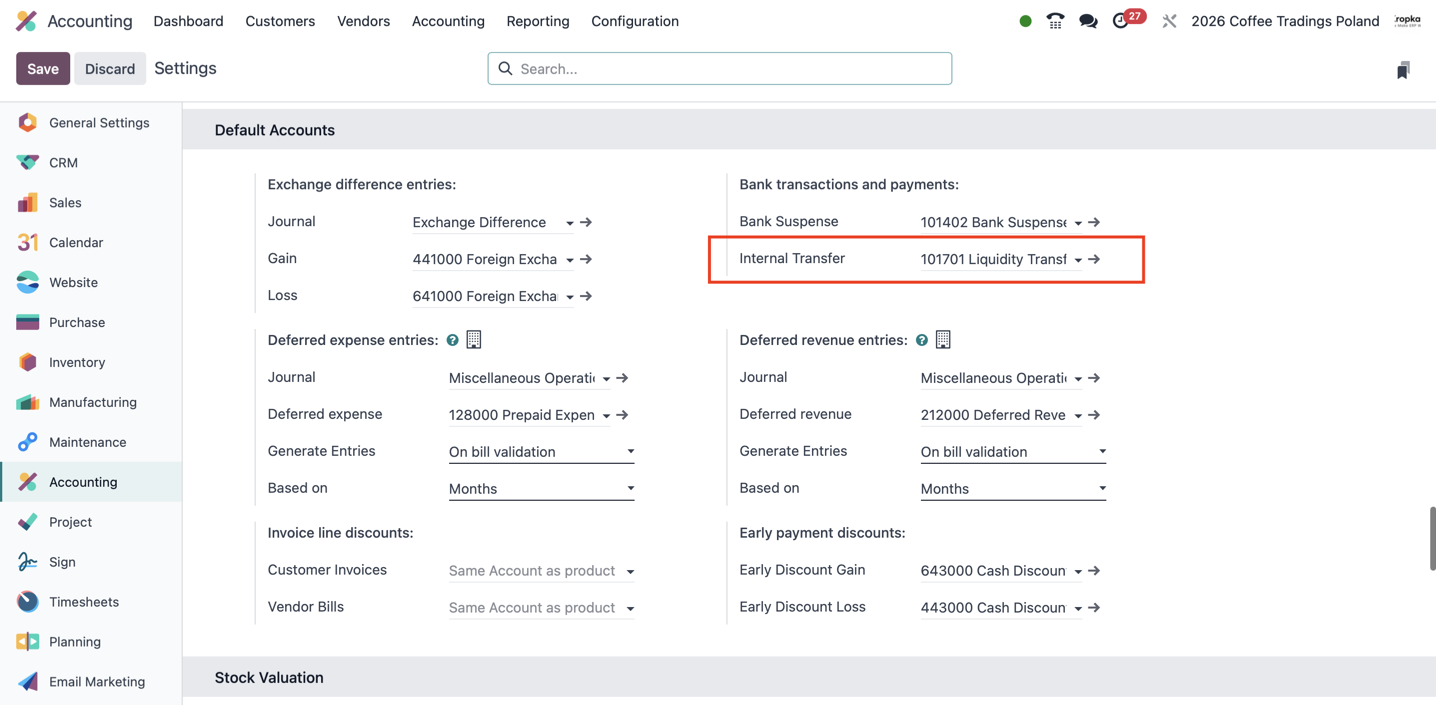
Example: transferring money from Bank A to Bank B
Suppose a company transfers PLN 10,000 between two of its bank accounts. The resulting accounting entries are:
| Transaction | Debit | Credit |
|---|---|---|
| Money leaves Bank A | Liquidity Transfer: PLN 10,000 | Bank A: PLN 10,000 |
| Money reaches Bank B | Bank B: PLN 10,000 | Liquidity Transfer: PLN 10,000 |
Once both sides are recorded and the corresponding clearing-account items are reconciled, this transfer has no remaining balance on Liquidity Transfer. If only the outgoing side has been recorded, the open item helps identify money still in transit or an incoming transaction that has not yet been processed.
Example: a currency transfer with an exchange loss
Now suppose the company sends PLN 4,300 from Bank A and receives EUR 1,000 in Bank B. For this illustrative example, the incoming EUR 1,000 is recorded at PLN 4,250 in the company’s base currency. Assume the PLN 50 difference has been verified as an exchange loss, with no separate bank fee.
All debit and credit amounts below are expressed in PLN, the company’s base currency. Bank B also records the EUR 1,000 foreign-currency amount.
| Transaction | Debit (PLN) | Credit (PLN) | Liquidity Transfer balance after entry (PLN) |
|---|---|---|---|
| PLN 4,300 leaves Bank A | Liquidity Transfer: 4,300 | Bank A: 4,300 | 4,300 debit |
| EUR 1,000 reaches Bank B, recorded at PLN 4,250 | Bank B: 4,250 | Liquidity Transfer: 4,250 | 50 debit |
| Recognize the exchange loss and clear the residual | Foreign Exchange Loss: 50 | Liquidity Transfer: 50 | 0 |
The company sent a base-currency value of PLN 4,300 and recorded PLN 4,250 on receipt. The PLN 50 loss is posted to the exchange-loss account; the corresponding credit clears the remaining debit on Liquidity Transfer. Reconciliation links the transfer items and the adjustment. The table illustrates the accounting result; whether Odoo generates the adjustment automatically depends on the currencies and configuration.
Recording and reconciling an internal transfer in Odoo 19
- Import, synchronize, or manually create the outgoing transaction in the source bank or cash journal and the incoming transaction in the destination journal.
- Use the Internal Transfers reconciliation model on one side to assign its counterpart to the internal-transfer account.
- Match the other side with the corresponding journal item on that account.
- Check any remaining difference before closing the transfer.
The exact interface depends on the Odoo version and installed modules. The important accounting principle is the same: both movements need to be recorded, and their clearing-account items need to be linked.
Contra entries and currency exchange in Odoo
When the source and destination accounts use different currencies, the two movements can have different values in the company’s base currency.
For example, a company whose base currency is PLN sends PLN 4,300 and receives EUR 1,000. If the incoming amount is recorded at a base-currency value of PLN 4,250, the clearing account has a PLN 50 difference to explain.
We check whether that difference comes from exchange-rate valuation, the bank’s conversion terms, or an explicit fee. Exchange losses, exchange gains, and bank charges should be posted to the appropriate accounts. A difference should not automatically be labelled an exchange loss: it can also be a gain, a fee, or an incorrect entry.
Odoo supports exchange-difference accounting during reconciliation. The outcome depends on the currencies, recorded rates, and account configuration. See the official bank reconciliation documentation.
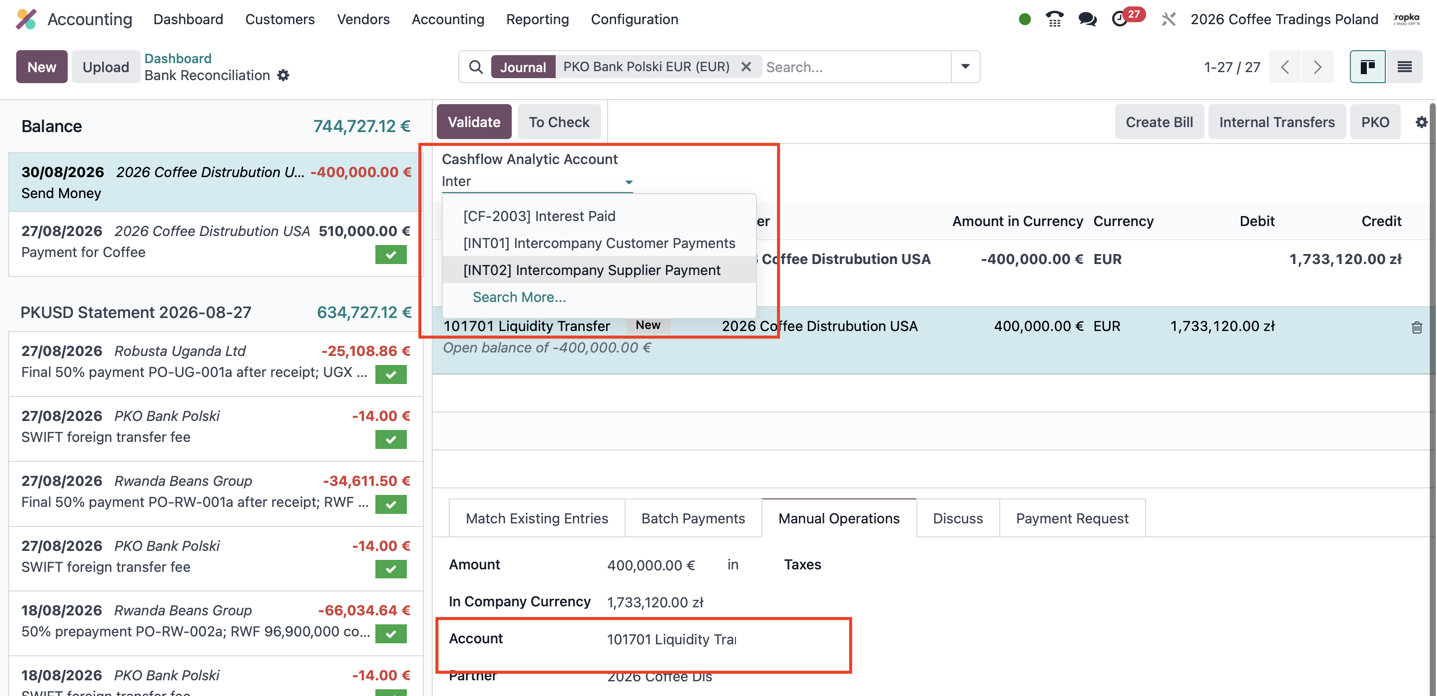
Why we reconcile the clearing account at month-end
At ERPixel, checking and reconciling transfer-account items is part of the monthly close. We match the outgoing and incoming sides, explain differences, and review any items left open.
This is our working practice, rather than a system requirement to reconcile only once a month. Companies with many transfers can reconcile more frequently. The objective is to distinguish genuine money in transit from missing receipts, duplicate entries, and unrecorded charges.
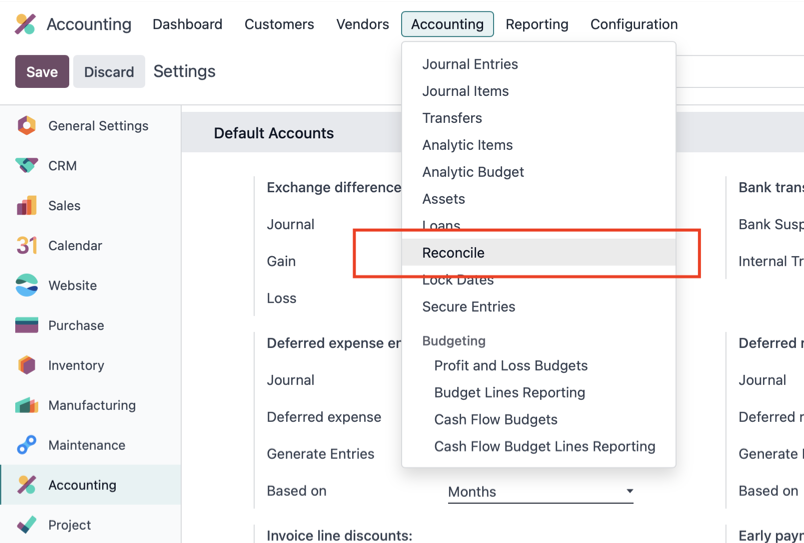
Transfers between different companies in Odoo
A transfer between two legal entities is different from moving money between accounts belonging to one company. Each entity has its own books, and the transfer needs an appropriate business basis and intercompany receivable or payable treatment.
Clearing accounts can help track these movements, but a shared account name does not make the two companies’ entries directly reconcilable. Standard Odoo 19 does not allow reconciliation across separate root companies. Its reconciliation checks enforce both account and company boundaries.
For a multi-company implementation, we therefore design the intercompany accounts, references, and matching process explicitly. Any additional cross-company matching functionality must be distinguished from standard Odoo reconciliation. Our Odoo implementation service covers configuring the system around the company’s actual operating structure.
Money sent on September 30 and received on October 2
Transfer dates matter. If money leaves an account on September 30 and arrives on October 2, the source account has already decreased at the September close, while the destination account has not yet increased.
We recommend preserving the actual transaction dates. Changing them merely to place both sides in the same month makes the bank balances and available liquidity harder to understand. The clearing account helps track the unfinished transfer.
For intercompany movements, also distinguish the cash flow of each legal entity from consolidated group reporting. A payment is a real outflow from the sending company’s account, even when another group company receives it. Group-level reporting needs its own treatment of internal movements.
Cash Flow Direct Method by ERPixel
For operational visibility, we use our Cash Flow Direct Method module to analyze bank balances and cash movements by account and transaction date.
It helps us see where money left, where it arrived, and how available funds changed over time. At ERPixel, we recommend this direct view for day-to-day liquidity management, particularly when a business operates multiple accounts, currencies, or companies.
The report and reconciliation serve complementary purposes: the report shows the movement of money, while reconciliation checks whether the corresponding transfer entries have been properly matched and differences explained.
Frequently asked questions
Does contra entry in Odoo require a custom module?
Internal transfers within one company are supported by standard Odoo Accounting. A particular intercompany workflow or additional cash-flow reporting may require configuration or an extension.
Is Liquidity Transfer an expense account?
No. In the workflow described here, it is a balance-sheet clearing account. Transfer fees and exchange gains or losses belong on their appropriate accounts.
Should the Liquidity Transfer balance always be zero?
A completed, fully reconciled transfer should leave no residual amount attributable to that transfer. The account as a whole can retain a balance when other transfers are in progress or need investigation.
Can I reconcile entries from two different companies?
Not directly across separate legal entities using standard Odoo 19 reconciliation. Intercompany accounting and any additional matching process need to be configured separately.
Does an internal transfer affect profit?
The principal amount moved between the company’s own cash or bank accounts does not create profit or loss. Associated fees and exchange differences can affect the result.