

- When a Simple Loan Breaks Your Balance Sheet
- Core Loan Management Concepts in Odoo
- Why Automated Loan Management Matters: Two B2B Scenarios
- How Loan Management in Odoo Automates the Entire Lifecycle
- 1. Setting Up the Right Accounts and Journals
- 2. Recording the Loan Funding
- 3. Creating the Loan and Generating the Amortization Schedule
- 4. Configuring Loan Settings and Posting Logic
- 5. Automatic Journal Entries Per Amortization Line
- 6. Reconciling Actual Bank Payments with the Loan
- 7. Closing or Cancelling Loans Safely
- Bringing It All Together – and What to Do Next
When a Simple Loan Breaks Your Balance Sheet
A mid-sized manufacturing company had just secured a $500,000 equipment loan. The cash hit the bank, production capacity increased, and management was happy. Three months later, their auditor wasn’t. The long-term and short-term portions of the loan were wrong, interest was misclassified, and the balance sheet no longer matched the amortization schedule from the bank.
The finance team had tried to manage everything in Excel: manual amortization tables, month-end reclassifications, and bank reconciliations. A single formula error in one column triggered a chain reaction of misstatements. What looked like a “simple loan” nearly delayed their audit and impacted their credit rating.
This is exactly the type of problem Loan Management in Odoo is designed to solve: one central loan record, automatic amortization, and fully generated journal entries that keep your financial statements accurate over time.
The key question this article answers: How can you use Loan Management in Odoo to automate the entire life cycle of a loan – from booking the funding to monthly payments and reclassification – while keeping your accounts compliant and reconciled?
Core Loan Management Concepts in Odoo
Before configuring any loans in Odoo Accounting, it helps to agree on a few core terms used throughout the system.
- Long-Term Loan Payable (Non-Current Liability)
This account holds the portion of your loan that is due after the next 12 months. In Odoo Loan Management, it’s the main liability account linked in the loan settings.
Example: You take a 5-year, $100,000 loan. After calculating the next 12 months of payments, $88,000 remains as long-term loan payable. - Short-Term Loan Payable (Current Liability)
This is the part of the loan due within the next 12 months. Odoo automatically moves amounts between short-term and long-term through reclassification entries generated from the amortization schedule.
Example: The upcoming 12 months of principal total $12,000. Odoo shows this in a separate loan payable short-term account so your balance sheet is properly classified. - Interest Expense Account
This account records the cost of borrowing over time. Each amortization line in Odoo includes an interest component that is posted to this expense account.
Example: A monthly loan payment of $1,887.12 includes $277.78 interest, which Odoo posts to the interest expense account in your profit and loss. - Amortization Schedule
The detailed schedule of each installment: principal, interest, payment date, remaining balance, and the short-term vs long-term breakdown. In Loan Management in Odoo, you can compute this automatically or upload it from a CSV provided by your bank.
Example: A 5-year, 5% loan with end-of-month payments is generated in Odoo with 60 monthly lines, each line showing principal, interest, outstanding balance, and theoretical long-/short-term portions. - Loan Journal
A dedicated journal used to post all loan-related entries: funding, payments, reclassification, and reversals. This keeps your loan movements clearly separated from day-to-day operational entries.
Example: You create a “Loans” miscellaneous journal in Odoo that becomes the default journal for all entries generated from loan amortization.
Why Automated Loan Management Matters: Two B2B Scenarios
Scenario 1: Services Company with Multiple Bank Loans
A growing IT services firm funds its expansion with three separate loans from two banks. Each has different interest rates, compounding methods, and repayment terms. The finance team maintains separate Excel amortization schedules and posts manual journals each month for principal, interest, and short/long-term reclassification.
As loan volumes increase, errors creep in: duplicated lines, misposted interest, missing reversals. The firm’s monthly closing starts slipping from 5 days to 10 days, and management loses visibility into true cash commitments and upcoming loan payments.
Scenario 2: Manufacturing Company Under Audit Pressure
A manufacturing company with a single large equipment loan faces a statutory audit. The auditors test:
- Whether short-term and long-term loan balances are correctly classified each month
- Whether interest expense ties to the contractual amortization schedule
- Whether bank payments fully reconcile to the loan accounts
Because everything is managed outside the ERP, reconciliation between the bank, the amortization Excel sheets, and the trial balance becomes a manual and stressful exercise. Any inconsistency risks audit findings and potential loan covenant issues.
In both cases, not using structured Loan Management in Odoo leads to:
- Inconsistent financial reporting month to month
- Time-consuming manual work at every period end
- Higher risk of audit issues and incorrect KPIs (debt ratios, interest coverage, etc.)
How Loan Management in Odoo Automates the Entire Lifecycle
The loan management features built into Odoo Accounting are designed to replace spreadsheets and ad-hoc processes with a controlled, auditable workflow. An official Odoo Partner like ERPixel can help you configure this correctly so every new loan follows the same robust logic.
1. Setting Up the Right Accounts and Journals
In your chart of accounts, you first define:
- A loan payable – long-term (non-current liability)
- A loan payable – short-term (current liability)
- A dedicated loan interest expense account
Then you create a specific Loan journal (usually a miscellaneous journal) to host all loan-related entries. This separation makes it easy to filter, audit, and understand loan movements without mixing them into operational journals like Sales or Purchases.
2. Recording the Loan Funding
When the bank disburses the loan, the money arrives in your bank account. In Odoo, this shows as a bank statement line (for example, +$100,000). During reconciliation, you:
- Debit the bank account (increase cash)
- Credit the long-term loan payable account (increase liability)
At this point, your balance sheet cleanly reflects the new loan: cash up, long-term liability up by the same amount.
3. Creating the Loan and Generating the Amortization Schedule
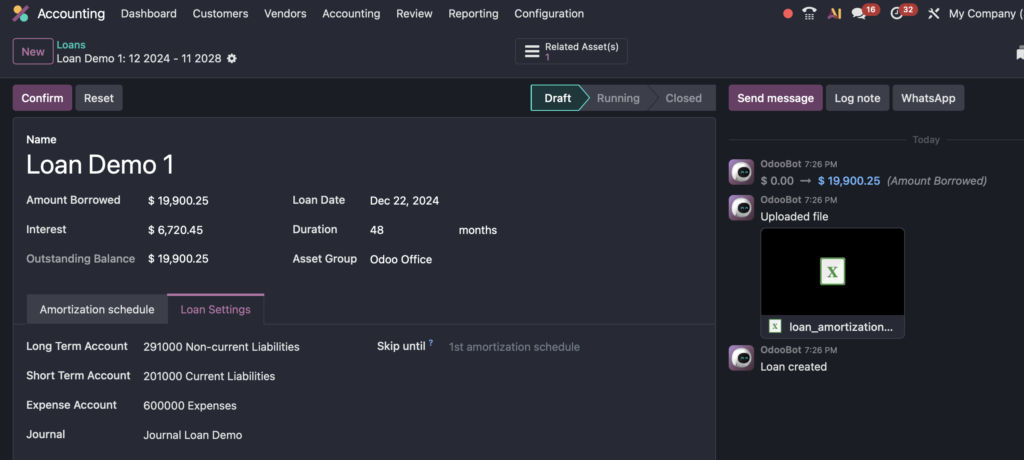
From Accounting → Loans in Odoo, you create a new loan record:
- Enter the amount borrowed, loan date, and duration
- Optionally tag it to an asset group to tie the loan to specific assets
- Choose to Upload (CSV amortization from your bank) or Compute the schedule
If you compute, you select:
- Compounding method (e.g., 30U/360, a common method where each month is 30 days out of 360)
- Loan amount, interest rate, and term
- Start date, and whether payments are end-of-month or on the anniversary date
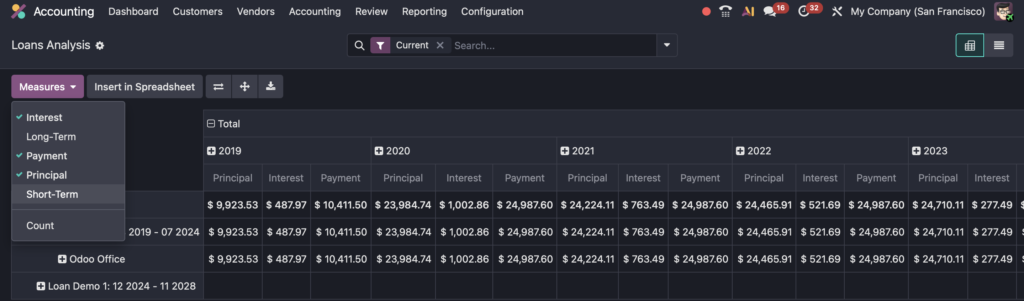
Odoo then builds the entire amortization schedule with principal, interest, payment amount, outstanding balance, and the theoretical short-term versus long-term split for each payment date.
4. Configuring Loan Settings and Posting Logic
In the loan settings tab, you link:
- Long-term loan payable account
- Short-term loan payable account
- Interest expense account
- The dedicated Loan journal
There is also an option to skip amortization until a given date. This is very useful during migration from another system or Excel: you can ignore already-accounted periods and start posting only from the go-live date.
5. Automatic Journal Entries Per Amortization Line
Once you confirm the loan, Odoo generates draft journal entries for each amortization line. For every period, three key entries are involved:
- Payment Entry
Records the principal and interest for the specific period. Conceptually:- Debit long-term loan payable (reducing long-term liability)
- Credit short-term loan payable (shifting the due amount to current)
- Debit interest expense
- Reclassification Entry
Adjusts the balance between short-term and long-term to reflect what is due in the next 12 months after the payment. This keeps your current vs non-current split correct at every cut-off date. - Reversal of Reclassification
Posted on the following day, this resets the temporary reclassification so the next month’s entries can be generated correctly. It ensures your month-end snapshot is accurate without locking the system in that state forever.
Together, these entries ensure that if you review your balance sheet month by month, you always see the correct picture of long-term vs short-term obligations and the corresponding interest expense in your P&L.
6. Reconciling Actual Bank Payments with the Loan
When your bank withdraws the monthly installment, the payment appears as a negative bank statement line. Odoo allows you to define a Reconciliation Model for loan payments, for example:
- Rule name: Loan Payment
- Condition: Label contains “loan” (you can make this more specific to your bank’s reference text)
- Counterpart account: Short-term loan payable
- Autovalidate: enabled
With this in place, the bank statement line is automatically matched to the correct loan entry. Your bank account decreases, your short-term liability is reduced, and reconciliation becomes a one-click or fully automated process.
7. Closing or Cancelling Loans Safely
Odoo also manages the end-of-life scenario for loans:
- Close Loan: cancels remaining draft entries but keeps posted entries for audit trail
- Cancel Loan: deletes all entries, including posted ones, which is useful for testing in a sandbox environment but must be used with care in production
A partner like ERPixel typically guides customers on which approach to follow in production, especially when dealing with partial early repayments, refinancing, or restructuring of existing loans.
Bringing It All Together – and What to Do Next
The initial story of the misaligned loan and the frustrated auditor is avoidable. By using Loan Management in Odoo, you define loan accounts once, compute or import amortization schedules, and let Odoo generate and post all related journal entries. Your balance sheet always shows the correct short-term vs long-term split, interest hits the right expense account, and bank payments reconcile cleanly against loan movements.
In practical terms, this means faster month-end closing, lower audit risk, and reliable visibility into your debt position and cash impact. The complexity of loan accounting is handled by the system instead of spreadsheets.
If you want to implement or optimize Loan Management in Odoo as part of a broader ERP or accounting rollout, ERPixel, an official Odoo Partner, can configure your accounts, journals, reconciliation models, and migration approach so your loans are accurate from day one.
Ready to move away from fragile Excel sheets and manual calculations? Contact ERPixel today to plan and implement a robust Odoo loan management setup that keeps your finance team in control and your numbers audit-ready.